What are the best tools for tracking local SEO rankings in 2026? This question keeps local business owners up at night. You invest hours optimizing your Google Business Profile. You build citations across dozens of directories. You generate reviews and create location-specific content. But how do you actually measure if any of this work is paying off? The answer seems simple: check your rankings. But local SEO rank tracking is anything but simple.
Google does not show the same search results to everyone. Two people searching the exact same keyword in the exact same city can see completely different local packs. One person sees your business at number one. The other does not see you at all. Google determines which results to show based on IP address, device GPS data, and even past search history. This creates a massive problem for standard rank tracking tools. Most tools send queries from datacenter IP addresses. Google recognizes these IP ranges and either returns generic, non-localized results or blocks the queries entirely.
The only reliable way to track local rankings accurately is through residential proxies. These are genuine IP addresses located in the exact city you are targeting. Google reads them as legitimate local users and returns the actual local SERP for that location. Only a handful of tools get this right. This guide breaks down the top local SEO rank tracking tools available today. You will learn which platforms deliver accurate city-level data, which features actually matter, and how to choose the right tool for your business. You will also discover how to evaluate an SEO partner if you decide to outsource your local search strategy.
Why Local Rank Tracking Is Different
Google does not show the same search results to everyone. Two people searching the same keyword in the same city can see completely different local pack results. This happens because Google uses three signals to determine location: IP address, Google domain, and device GPS data.
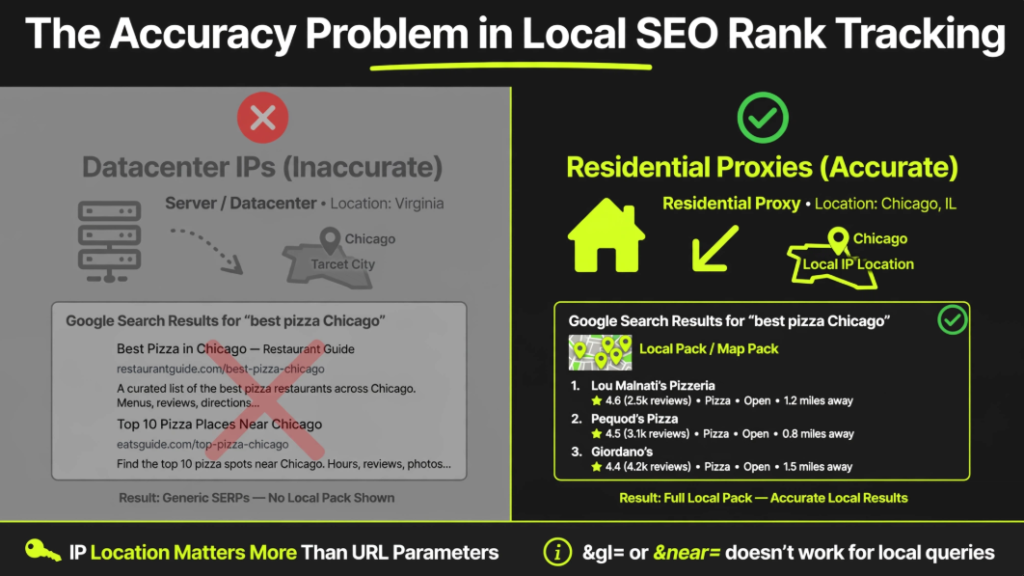
IP address is the strongest signal. A residential IP in Chicago pulls Chicago results. A datacenter IP in Virginia pulls something else entirely. This creates a problem for standard rank tracking tools. Most tools send queries from geographically concentrated datacenter infrastructure. Google has learned to identify these IP ranges. It either returns generic non-localized results or blocks the queries entirely.
Some tools try to work around this by appending location parameters like &gl= or &near= to their queries. It does not work. Google weights the IP’s physical location far more heavily than URL parameters for local-intent queries.
The fix is routing queries through residential proxies with genuine IPs in the target location. Only then do you see what real local users actually see.
What to Look for in a Local Rank Tracking Tool
Before you choose a tool, understand what features actually matter for local SEO tracking. Not every rank tracker handles local tracking well. Here is what to check:
City and ZIP code-level tracking is non-negotiable. Your tool must simulate searches from specific locations, not just countries or broad regions. Without this, you are tracking generic results that do not reflect your actual local visibility.
Local Pack tracking is essential. The Google Map Pack is where local search traffic concentrates. Around 42% of local searchers click on Map Pack results. Your tool must track these positions separately from organic rankings.
Mobile vs desktop tracking matters because local SERPs differ significantly between devices. Google prioritizes mobile results for local searches. Your tracking should reflect this reality.
SERP feature monitoring helps you spot opportunities. Your tool should notify you when keywords trigger Map Packs, featured snippets, or People Also Ask boxes.
Historical data and trend visualization lets you see performance over time. Sporadic checks are not enough for local SEO. You need consistent daily or weekly tracking to spot trends and algorithm impacts.
Top Tools for Tracking Local SEO Rankings
BrightLocal
BrightLocal remains one of the most widely recommended dedicated local SEO platforms. It handles location-specific tracking better than most alternatives. You can set up multiple tracking locations across different cities. Automated reports show how your rankings shift across geographical points.
The platform also includes citation management, review monitoring, and Google Business Profile insights. This makes it a comprehensive solution for agencies and multi-location businesses. Plans start around £29 per month.
BrightLocal is ideal for businesses that need dedicated local SEO tools rather than general SEO platforms.
SE Ranking
SE Ranking is an all-in-one SEO platform with robust local tracking features. It allows you to track keyword positions across multiple countries, cities, regions, and languages in real time. The platform supports Bing, Google, and Yahoo tracking.
SE Ranking is known for balancing tool capabilities with cost. It includes white-label reports, detailed client dashboards, and comprehensive competitor analysis. Plans start at $24.80 per month per user.
This tool suits teams, agencies, and consultants who need comprehensive features without enterprise pricing.
Nightwatch
Nightwatch has evolved from a traditional rank tracker into a broader SEO and AI visibility platform. Its biggest differentiator is local SEO tracking with geo-grid technology. You can track rankings across thousands of highly specific locations down to ZIP-code and GPS-level precision.
Instead of relying on spreadsheets and raw ranking tables, Nightwatch visualizes data through heatmaps and grids. This makes local visibility much easier to interpret.
Nightwatch also tracks rankings across Google, Bing, YouTube, DuckDuckGo, and Yahoo, plus AI platforms like ChatGPT, Claude, Gemini, and Perplexity. Plans start at around $39 per month.
This tool is ideal for SEO professionals who need detailed local visibility visualization.
AccuRanker
AccuRanker is built for SEOs and marketers who need fast, accurate ranking data. Its headline feature is on-demand ranking updates. You can refresh keyword positions instantly instead of waiting for weekly updates.
The platform offers precise local tracking down to GPS-level locations. It supports more than 50 SERP features, including Local Packs, featured snippets, and knowledge panels. AccuRanker also tracks AI and LLM visibility, helping you monitor how brands appear in evolving search experiences.
AccuRanker is more expensive than most alternatives, starting at around $249 per month. It suits agencies and enterprise teams that need speed and precision.
Keyword.com
Keyword.com is a focused rank tracker that stays simple and effective. It tracks keyword performance across Google, including local, mobile, and ZIP-code-level rankings. The platform also monitors AI visibility across ChatGPT, Gemini, Claude, and Perplexity.
One of Keyword.com’s strongest selling points is ease of use. The interface is straightforward. Reporting is agency-friendly. Features like live SERP verification, white-label dashboards, and on-demand ranking updates make it appealing for agencies and smaller SEO teams.
Entry-level plans start at around $4 per month for 50 tracked keywords updated weekly. This makes it accessible for small businesses.
Whitespark
Whitespark is a specialized local SEO toolset focused on rank tracking, citation building, and reputation management. It accurately tracks rankings on Google and Bing in any city across the local pack, local finder, maps, and organic results.
The Local Citation Finder helps you find citation opportunities your competitors have. The Reputation Builder helps you grow online reviews and customer feedback.
Whitespark is particularly useful for businesses and agencies focused on local citation management alongside rank tracking.
GMB Radar
GMB Radar is one of the most economical local rank trackers. It tracks local search rankings from exact locations using coordinates at the time of your choice. Rankings are accurate and fresh, not delivered from a database.
You get 300 free credits on signing up. White-label reports are available for client sharing. Plans start at $15 per month.
This is a budget-friendly option for small businesses and solo practitioners.
LocalRank
LocalRank.so is an all-in-one local SEO platform designed for businesses and agencies. It offers a Local Rank Tracker with real-time location-specific ranking data for service-area businesses. Automated and scheduled reporting, competitor comparisons, and white-label client reports are included.
The platform also includes a Local Citations Builder that submits your NAP to 100+ vetted directories with one click. Google Business Profile automation helps schedule posts, respond to reviews, and manage multiple locations. Plans start at $47.50 per month.
How to Track Rankings by City Using an API
For advanced users, a SERP API offers a flexible way to build custom local tracking systems. You can define target keywords and target cities. The API sends city-specific searches and returns structured search results in JSON format.
A typical setup looks like this:
- Define target keywords and cities
- Send location-specific queries through a SERP API
- Extract organic and local pack results
- Check where your domain appears
- Save ranking data to CSV for analysis
This approach is ideal for agencies managing many clients or businesses tracking multiple locations. However, it requires technical expertise to set up and maintain.
Free Options: Google Search Console
Google Search Console (GSC) provides basic position data at no cost. It shows average position, impressions, clicks, and CTR per query or page. This is a good starting point for small businesses with limited budgets.
However, GSC has significant limitations. It does not provide city-level granularity. It does not track competitor rankings. It lacks SERP feature context. The data is averaged across all locations, making it unsuitable for precise local tracking.
Use GSC for foundational insights. But for actual local SEO tracking, you need a dedicated tool.
The Accuracy Problem: Why Residential Proxies Matter
Most rank tracking tools send queries from datacenter IPs. Google has learned to identify these IP ranges and either returns generic results or blocks queries entirely. The rank data you get back reflects a datacenter in Virginia or Amsterdam, not a real user in the city you are trying to track.
Some tools try to append location parameters like &gl= or &near= to their queries. It does not work. Google weights the IP’s physical location far more heavily than URL parameters for local-intent queries.
The only reliable way to get accurate local rankings is routing queries through residential proxies. These are genuine IP addresses in the target location. Google reads them as legitimate local users and returns the actual local SERP for that location.
When evaluating a rank tracking tool, ask how it handles city-level accuracy. If the answer does not mention residential proxies or accurate IP routing, the data may be unreliable.
Choosing an SEO Partner for Local Rankings
If you decide to hire an agency or freelancer for local SEO, choose carefully. The market is crowded, and quality varies widely.
Green Flags
A good local SEO provider asks about your revenue, not just your rankings. They want to know if the phone is ringing. They have real-world case studies from businesses similar to yours. They provide a clear checklist of monthly actions so you know exactly what you are paying for.
They explain complex SEO concepts in plain English rather than drowning you in jargon. They ask about your specific industry and buyer’s journey. They demonstrate an understanding of your customers’ needs.
Red Flags
Avoid anyone guaranteeing the #1 spot. No agency can guarantee specific positions because Google’s algorithm considers factors outside anyone’s control, like proximity. Avoid providers who will not tell you exactly what they are doing on your website. They may be using black hat tactics that could get you banned.
Be skeptical of unusually low pricing. If it sounds too cheap to include real work, it probably does not. Avoid vague deliverables like “We’ll optimize your local SEO” without specific actions listed.
Questions to Ask
Before signing any contract, ask these questions:
- What specific actions will you take in months 1, 2, and 3?
- How do you approach review generation and reputation management?
- What tools do you use for local rank tracking and reporting?
- Will I retain ownership and admin access to my Google Business Profile at all times?
- What does your monthly reporting include and when will I receive it?
- How do you measure ROI and success?
- Do you have case studies from businesses similar to mine?
Your Local SEO Tracking Strategy Starts Now
Local SEO tracking is not optional. Your rankings vary by location, device, and time of day. Without accurate tracking, you are making decisions based on incomplete data. Choose a tool that delivers city-level precision. Track consistently over time. Review your data weekly and adjust your strategy accordingly.
Your local customers are searching for you right now. Make sure you know exactly where you stand in their search results.
Frequently Asked Questions (FAQ)
How to track local SEO rankings effectively?
Track rankings using a dedicated local SEO tool that supports city or ZIP code-level targeting. Use residential proxies or tools that route queries through genuine local IPs for accurate data. Track both Map Pack and organic positions separately. Monitor rankings consistently over time to spot trends.
How to track local SEO rankings in the United States?
Use tools that support city-level tracking across US locations. Set up tracking for each city or ZIP code that matters to your business. Residential proxies are particularly important for US tracking because Google’s local results vary significantly across states and cities.
How to choose an SEO partner for local rankings?
Look for providers who ask about your revenue goals, not just your rankings. Check for real case studies from similar businesses. Avoid anyone guaranteeing specific positions. Ask for a clear monthly action checklist. Ensure you retain ownership of your Google Business Profile. Prefer providers who explain SEO in plain English.
Which tool is best for tracking local SEO rankings?
The best tool depends on your needs. BrightLocal is excellent for dedicated local tracking. SE Ranking balances features with cost. Nightwatch offers detailed geo-grid visualization. AccuRanker provides fast on-demand updates. Keyword.com is accessible for smaller budgets. Evaluate based on your tracking volume, budget, and required features.
What should monthly local SEO reporting include?
At minimum: local pack position changes for target keywords, GBP insights (impressions, clicks, calls, direction requests), review count and rating trends, citation accuracy score, and website traffic from local searches. Good agencies also include competitive benchmarking and strategic recommendations.
Read Also: How to Create Content for Local SEO: Proven Strategies to Rank Higher and Drive Local Traffic

M. Awais Khan is a Business Development and Digital Growth Strategist at SkillsHeaven, specializing in SEO, local search optimization, and performance-driven digital marketing. With experience supporting 100+ businesses, he develops and implements data-driven strategies that help companies increase online visibility, generate qualified leads, and drive sustainable revenue growth. His expertise spans Local SEO, Google Ads, social media marketing, and conversion-focused website optimization, ensuring every project is aligned with measurable business outcomes and long-term success.