
To add Google AdSense to your website, you need to sign up for an AdSense account, get your site reviewed and approved by Google, paste a single piece of code into your site’s header, and then choose how and where your ads will display. Once approved, Google automatically places relevant ads on your pages and pays you based on how visitors view and interact with them. The process to add Google AdSense to your website is free, and most of the setup takes less than an hour once your site meets Google’s approval requirements.
This guide walks through the full setup process step by step, why sites get rejected, then breaks down exactly how much you can realistically expect to earn once your ads are live.
Before You Add Google AdSense to Your Website
Google reviews every site before approving it for AdSense, and a few basics need to be in place first.
Original content. Your site needs genuine, original content, not copied or thin pages with little substance.
Enough content to review. While there’s no official minimum, sites with at least 20 to 30 solid pages or posts tend to get approved more consistently than brand new sites with just a handful of pages.
Policy compliance. Your site needs to follow Google’s content policies, avoiding restricted content categories and misleading navigation.
A clean, functional design. Easy navigation, fast loading times, and a mobile friendly layout all factor into approval, since Google wants ads to appear on sites that provide a genuinely good user experience.

Step 1: Sign Up for a Google AdSense Account
Head to the AdSense homepage and create an account using an existing Google account, or set up a new one if needed. During sign up, you’ll enter your website’s URL, your primary email address, and the country or territory where you’ll receive payments. If your site isn’t ready yet, you can leave the URL field blank and select the option to add your site later.
Step 2: Connect Your Site to AdSense
Once your account is created, Google will generate a small piece of code, often called the AdSense connection code, that needs to be added to your site. This single line of code goes inside the <head> section of every page on your site, and it’s what allows Google to verify ownership and begin its review process.
If you’re using WordPress, a plugin like Insert Headers and Footers makes this simple, letting you paste the code once so it applies sitewide instead of editing every individual page manually. Other website builders, like Wix or Squarespace, usually have a dedicated settings section where this code can be pasted directly.
Step 3: Wait for Google’s Review
After the code is added, click the review request button inside your AdSense dashboard. This review typically takes anywhere from a few days up to two weeks, depending on your site’s content and how quickly Google’s systems process the request. During this waiting period, it’s worth continuing to add quality content, since an active, growing site tends to move through review more smoothly than one that goes quiet.
Why Sites Get Rejected and How to Fix It
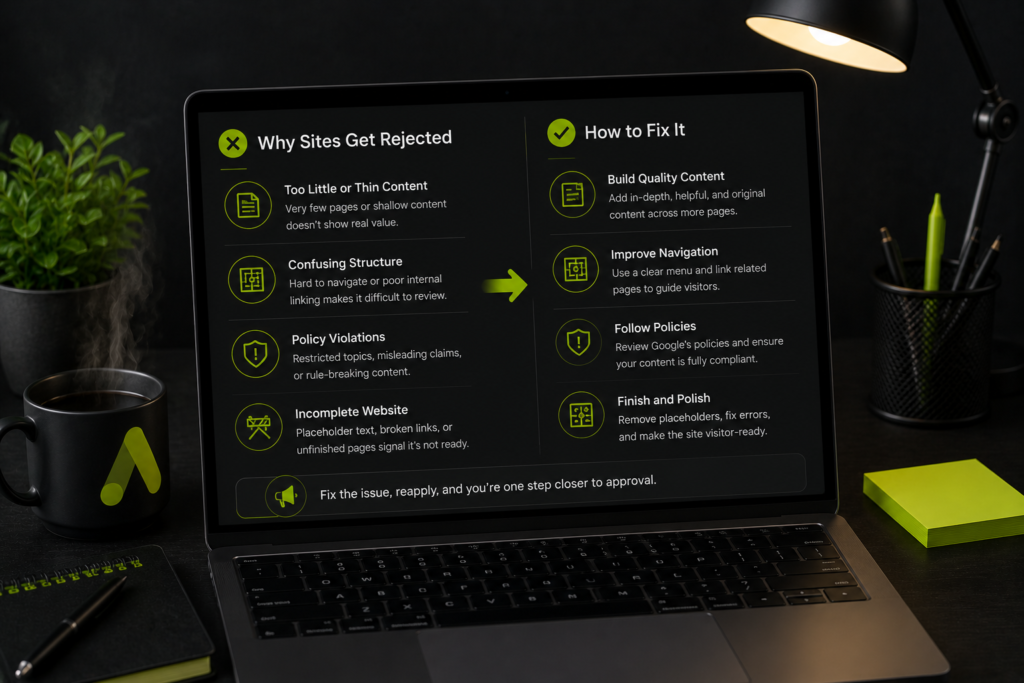
A rejection isn’t the end of the road, and most sites can reapply once the underlying issue is addressed. A few common rejection reasons account for the vast majority of cases.
Insufficient content. A site with only a handful of short pages often gets flagged simply for not having enough substance for Google to evaluate. Publishing more genuinely useful, original pages before reapplying usually resolves this.
Navigation issues. If visitors, or Google’s review systems, struggle to find their way around your site, that counts against approval. A clear menu structure and logical internal linking between related pages both help here.
Policy violations. Content touching restricted categories, or pages that mislead visitors about what they’ll find, will block approval regardless of how much content exists. Reviewing Google’s publisher policies directly before reapplying prevents repeating the same mistake.
Under construction pages. A site with placeholder text, broken links, or sections still marked “coming soon” signals to Google that the site isn’t ready for real visitors yet, let alone advertisers.
Once the specific issue is identified and corrected, most sites can reapply immediately, though it’s worth waiting until the fix is genuinely complete rather than resubmitting the same problems repeatedly.
Step 4: Set Up Your Ad Units
Once approved, you have two main options for how ads appear on your site.
Auto ads. This is the easiest option for beginners, since Google’s system automatically decides the best placements and formats across your site based on your layout and content. To use this, go to the Ads section in your dashboard, select By Site, and copy the auto ads code, then paste it into your site’s header the same way you did with the initial connection code.
Manual ad units. This option gives you full control over exactly where ads appear. From the Ads section, select By Ad Unit, choose a format like display ads, name the unit, and pick a size or set it to responsive. Google will generate a specific code for that unit, which you then paste into the exact spot on your page where you want the ad to show.
Most publishers start with auto ads for simplicity, then gradually shift to manual placements once they understand which spots on their pages perform best.
How to Add Google Ads to Your Website on Different Platforms
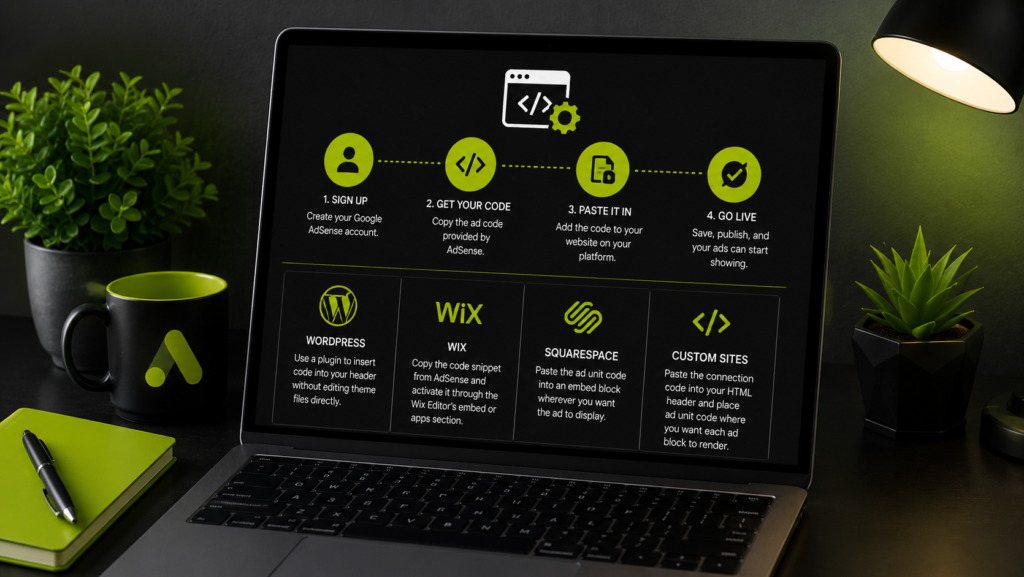
The core process to add Google ads to your website stays the same across platforms, sign up, get your code, paste it in, though the exact steps for pasting code differ slightly.
WordPress: Use a plugin to insert the code into your header without touching theme files directly, since theme updates can otherwise wipe out manually added code.
Wix: Copy the code snippet from AdSense, then activate it through the Wix Editor’s embed or apps section.
Squarespace: Paste the ad unit code into an embed block wherever you want the ad to display, since Squarespace doesn’t yet support full auto ads the same way WordPress does.
Custom built sites: Paste the connection code directly into your HTML header file, and place manual ad unit code exactly where you want each ad block to render.
How to Embed Google Ads in Your Website Without Breaking Your Layout
When you insert Google ads into your website, placement matters just as much as the code itself. Ads dropped randomly into content can disrupt the reading experience and actually hurt performance, since visitors who feel overwhelmed by ads tend to leave faster.
A few placements consistently perform well without harming user experience: within the content itself between paragraphs, in the sidebar for desktop layouts, and just below the main heading on mobile. Testing different placements over a few weeks, then checking which ones get the most engagement without increasing your bounce rate, is the most reliable way to find your site’s sweet spot.
How Much Can You Make From Google Ads
How much you can make from Google ads depends heavily on your niche, your traffic volume, where your visitors are located, and how well your content matches high value advertiser categories. There’s no single fixed rate, since earnings are calculated using a combination of a few key metrics.
CPC (cost per click): the amount you earn each time a visitor clicks an ad.
CPM (cost per 1000 impressions): the amount advertisers pay for every thousand times their ad is shown.
RPM (revenue per 1000 page views): an estimate of what you actually earn for every thousand page views your site receives, factoring in both clicks and impressions together.
As a rough benchmark, many publishers see anywhere from roughly $0.20 to $2.50 per 1000 page views, though this range shifts significantly depending on niche and audience location, with finance, technology, and health related content generally commanding noticeably higher rates than entertainment or general lifestyle content.
How Much Do Google Ads Pay and How the Revenue Split Works
Google doesn’t pay a flat rate, instead it shares a percentage of what advertisers actually pay for the ad space on your site. For display ads, publishers typically keep around 68 percent of the revenue, with Google retaining the remaining share. For search ads shown through AdSense for Search, the split works a bit differently, with publishers generally keeping just over half of the revenue generated.
This means the real answer to how much Google ads pay comes down to your traffic quality and volume multiplied by your site’s average RPM, rather than any single fixed number that applies across every website.
How to Make Money With Google Ads Consistently
Making sustainable money with Google ads generally comes down to three connected factors working together.
Traffic volume and quality. More visitors generally means more potential ad views and clicks, but targeted, engaged visitors from search convert into ad revenue more reliably than passing social media traffic. This is exactly why a real SEO and content strategy matters even for a site monetized through ads rather than direct sales, since organic search traffic tends to stick around longer and view more pages than a visitor who clicked a social post and bounced within seconds.
Niche selection. Some content categories simply attract higher paying advertisers. Choosing a niche with reasonable earning potential from the start makes a meaningful difference over time.
Ad placement and format testing. Regularly reviewing which ad units perform best and adjusting placement, size, and format based on real data tends to steadily improve overall RPM without needing to add more ad units.
How to Increase Your RPM Without Adding More Ads
Beyond basic placement, a few specific tactics tend to move RPM upward without cluttering a page with extra ad units.
Improve page load speed. Slow loading pages hurt both user experience and ad viewability, since a visitor who leaves before an ad fully renders generates no revenue at all. Faster sites also tend to rank better in search, compounding the benefit.
Write genuinely complete, in depth content. Pages that thoroughly answer a topic tend to keep visitors reading longer, increasing the chance an ad gets seen and interacted with naturally, rather than skimmed past in a few seconds. This is the same principle covered in our guide on building topically complete content, since pages that cover a subject in depth tend to attract more organic traffic and hold attention longer than thin, surface level posts.
Target higher value keywords. Content built around topics advertisers pay more to reach, such as finance, insurance, or business services, generally produces a higher RPM than general entertainment topics, even with similar traffic volume.
Review geographic traffic sources. Visitors from certain countries tend to generate higher ad rates than others, so understanding where your traffic actually comes from helps set realistic expectations and informs future content decisions.
How to Earn Money From Google Ads Without Hurting User Experience
It’s tempting to add as many ad units as possible once you’re approved, but overloading a page with ads usually backfires. Visitors who find a page cluttered tend to leave quickly, which increases bounce rate and can eventually reduce how favorably Google’s algorithm treats your ad placements.
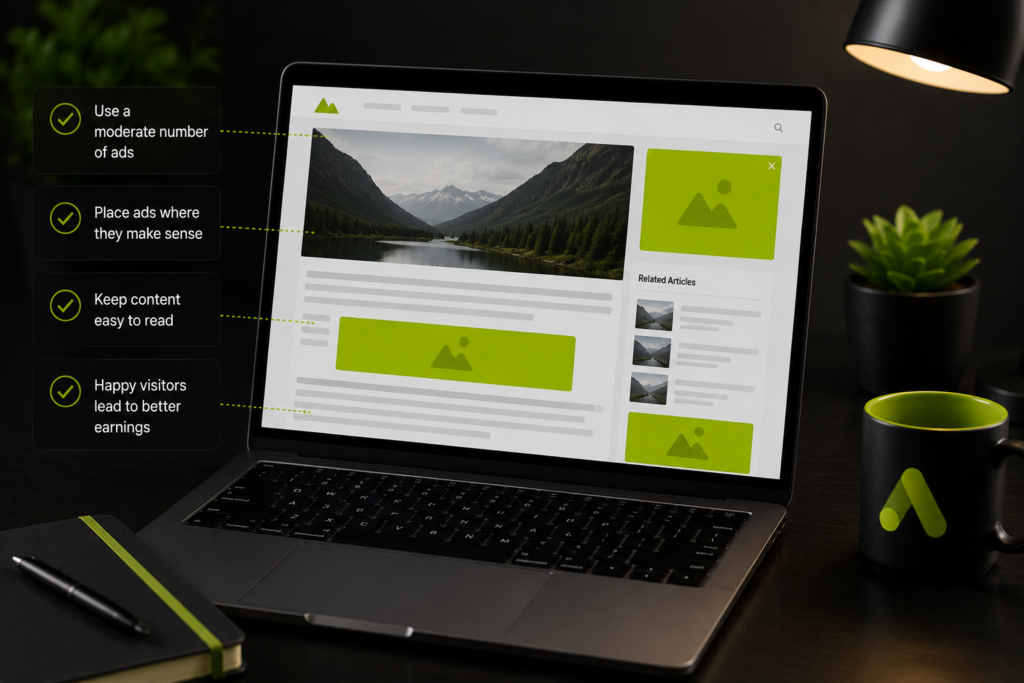
A more sustainable approach is to start with a smaller number of well placed ads, monitor performance for a few weeks, and only add more once you’re confident the additional ads aren’t hurting engagement or driving visitors away before they’ve had a chance to read your content.
AdSense Alternatives Worth Knowing About
While AdSense remains the most widely used option for beginners, it isn’t the only way to monetize a website, and larger publishers in particular often diversify beyond it. Ad networks built specifically for higher traffic sites can sometimes offer better rates than standard AdSense once a site crosses a certain traffic threshold, though most require an application and a minimum traffic level to qualify.
Direct advertiser relationships, where a business pays to place an ad directly on your site without a middleman network, can also produce meaningfully higher revenue per impression, though they require more manual outreach and negotiation than simply pasting a code snippet.
For most beginners, though, AdSense remains the most practical starting point, since it requires no minimum traffic level to apply and handles the entire advertiser relationship automatically.
Common Mistakes When Adding Google AdSense to a Website
A few recurring mistakes slow down both approval and earnings:
- Applying with a site that has too little original content, leading to rejection
- Placing the connection code incorrectly, causing verification to fail
- Overloading pages with too many ad units right away
- Clicking on your own ads, which directly violates AdSense policy and can result in account suspension
- Ignoring mobile layout, since a large share of traffic and ad revenue now comes from mobile visitors
Frequently Asked Questions
How long does AdSense approval usually take?
Typically a few days to two weeks, though it can occasionally take longer depending on your site’s content volume and how busy Google’s review systems are at the time.
Can I reapply immediately after a rejection?
Yes, but it’s better to first fix the specific issue mentioned in the rejection email rather than reapplying right away with the same problems still present.
Do I need a minimum amount of traffic to get approved?
No, AdSense doesn’t require a specific traffic threshold for approval, though a site with genuinely no visitors will have little reason to run ads in the first place.
Is AdSense free to use?
Yes, there’s no cost to apply, get approved, or run ads through AdSense. Google earns its share only from the revenue generated when ads are actually shown and clicked.
Final Thoughts
Learning how to add Google AdSense to your website is a straightforward process once your site meets the basic content and policy requirements: sign up, verify ownership with a simple code, get approved, and choose between auto ads or manual placements based on how much control you want. How much you can actually make from Google ads depends far more on your traffic and niche than on the setup itself, so pairing your AdSense setup with genuine, consistent content and traffic growth, ideally backed by a real SEO and content strategy, is what turns a basic ad placement into real, sustainable income over time.

Wali Shah is the Founder and CEO of SkillsHeaven, a digital growth agency specializing in Local SEO, Google Ads, and conversion-focused website development. With over 8+ years of experience, he has helped scale 170+ businesses, including 93+ limousine companies globally, by building structured, lead-generating digital systems. His expertise spans local search optimization, paid media strategy, and high-performance website development, all aligned with measurable business growth. Known for a data-driven and ethical approach, Wali focuses on creating scalable marketing systems that increase visibility, generate qualified leads, and drive long-term revenue for service-based businesses.