
If you want to know how to develop web application solutions that actually work for real users, the process comes down to six core stages: planning the idea, choosing a tech stack, designing the interface, building the front end and back end, connecting a secure database, and testing before launch. This guide walks through each stage in detail, along with the related questions people ask most often, including the difference between a web app and a website, how to build a portal, what custom healthcare web app development requires, and how social media has changed user expectations for every modern web application.
A web application is different from a regular website because it lets users complete actions, not just read information. Online banking dashboards, booking systems, patient portals, and project management tools are all examples of web applications, and understanding how they are built helps anyone evaluating a project, hiring a developer, or simply learning the basics of modern software.
What Is a Web Application and Why Does It Matter
A web application, often shortened to web app, is software that runs inside a browser instead of being installed on a device. Users open it through a URL, the same way they would visit any website, but instead of static pages, they get an interactive tool that lets them create, update, retrieve, or delete data. A customer dashboard, an appointment scheduler, an inventory tracker, and an online store checkout system are all common examples.
The difference between a website and a web application is worth clarifying early, since the two terms are often used interchangeably. A website mostly displays information and changes only when someone updates the content manually. A web application responds to the user in real time. It pulls data from a server, processes it, and sends back a result, often without a full page reload in modern builds. This is what makes tools like a calendar booking system or a client dashboard far more functional than a plain brochure style site.
Knowing how to develop web application projects properly starts with understanding this distinction, because it shapes nearly every decision that follows, from the framework chosen to the database structure underneath it.
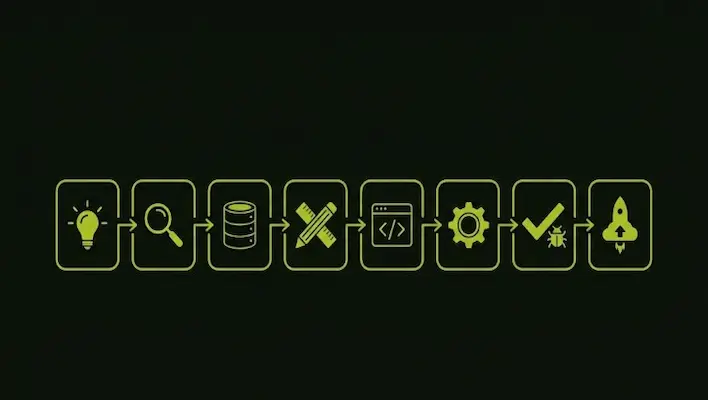
How to Develop Web Application Step by Step
There is no single fixed formula, but most successful builds follow a similar sequence. Here is how the process typically unfolds from idea to launch.
Define the problem and the audience
Every useful web application solves a specific problem for a specific group of users. Before any code gets written, the goal, the target audience, and the core feature list need to be mapped out clearly. A loyalty rewards portal and a logistics tracking dashboard have very different requirements, so this stage prevents wasted development time later on.
Research the market and existing solutions
Once the problem is defined, the next step is reviewing what already exists. Looking at comparable platforms, noting what works well, and identifying gaps in the current options gives a clearer technical direction. This research also informs feature priority and overall user experience decisions before design even starts.
Choose the right technology stack
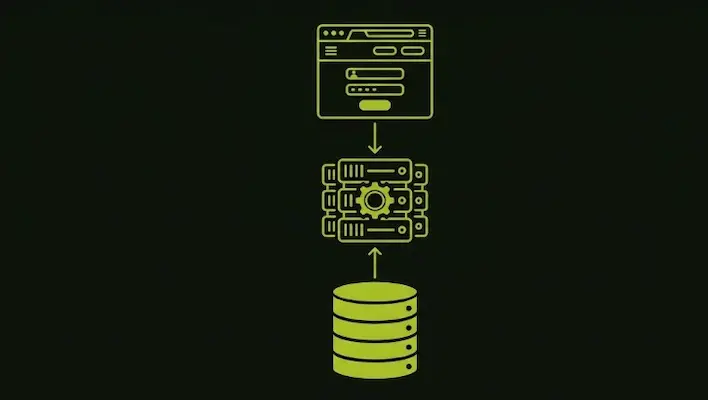
This is one of the most important decisions in the entire process of how to develop a web application. The stack typically includes a front end framework such as React or Vue, a back end language such as Node.js, Python, or PHP, and a database system such as MySQL or MongoDB. The right combination depends on the application’s complexity, expected traffic, and long term maintenance needs..
Design the user interface and user experience
A web application succeeds or fails based on how easily people can use it. This stage involves wireframing the layout, choosing a clear visual hierarchy, and mapping out user flows so that every click leads somewhere logical. Mobile responsiveness matters a great deal here, since most users now browse primarily from smartphones rather than desktop computers.
Build the front end
The front end is everything the user sees and interacts with directly: buttons, forms, menus, dashboards. This layer is built with HTML, CSS, and JavaScript, often using a framework to speed up development and keep the codebase organized as the application grows in complexity.
Build the back end and connect the database
The back end manages the logic that users never see, including authentication, data processing, and server communication. The database stores everything the application needs to function, from user accounts to transaction history. Strong back end architecture is what allows a web application to scale smoothly as more users join over time.
Test thoroughly before launch
Testing catches bugs, security gaps, and performance issues before real users encounter them. This includes functional testing, security testing, load testing, and cross browser checks. A soft launch with a small group of early users is often a useful way to catch issues that internal testing alone might miss.
Deploy and maintain
Once testing is complete, the application is deployed to a live server and made available to the public. Launch is not the finish line though. Ongoing maintenance, security patches, and feature updates keep the application relevant and protect it against emerging vulnerabilities over its lifespan.
How to Develop a Web App Versus a Traditional Website
People often search for how to develop a web app assuming it follows the same process as building a website, but the two diverge quickly once development starts. A website is mostly front end work paired with a content management system. A web app requires serious back end engineering, database design, user authentication, and often integrations with third party tools such as payment gateways or messaging systems.
This distinction matters most when estimating timelines and budgets. A static website can sometimes be finished in days. A genuine web application, with login systems, data processing, and dynamic content, is a longer engineering project that involves planning closer to traditional software development than simple page building.
How to Develop Web Projects: Custom Builds Versus No Code Platforms
A growing number of people ask how to develop web projects without hiring a full engineering team, and no code or low code platforms have made this far more achievable than it was even a few years ago. These tools let non technical users assemble forms, dashboards, and workflows visually, which works well for simple internal tools, quick prototypes, or proof of concept projects.
No code platforms do come with real limits, though. Custom integrations, advanced security requirements, and complex business logic usually need actual code behind them. For any project that depends on handling sensitive data, processing payments, or supporting a large number of simultaneous users, a custom coded solution tends to remain the more reliable long term option, even though it generally takes longer to launch than a drag and drop builder.
How to Develop a Web Portal
A web portal is a specific type of web application built around personalized, login based access to information. Employee portals, student portals, vendor portals, and client dashboards all fall into this category. Learning how to develop a web portal involves the same core stages as any web application, with extra attention given to user roles, permission levels, and secure authentication, since portals often handle private or sensitive data tied to individual accounts.
A well built portal centralizes information that would otherwise be scattered across emails, spreadsheets, and separate systems. For an organization managing multiple departments, branches, or service categories, a portal can significantly reduce administrative back and forth while giving users a single, consistent place to find what they need.
Who Provides Custom Healthcare Web App Development
Healthcare is one of the most demanding industries for web application development, and for good reason. A healthcare web app often manages patient records, appointment scheduling, telehealth video sessions, and billing information, all of which require strict data protection standards under regulations such as HIPAA in the United States or GDPR in Europe.
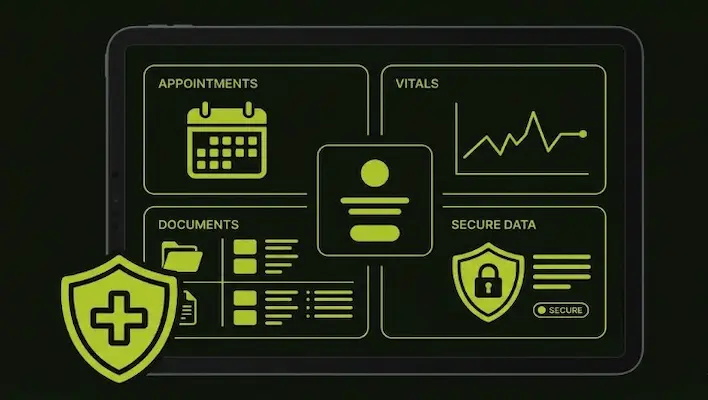
A provider offering custom healthcare web app development needs to deliver more than just a functional interface. The application must include encrypted data storage, secure authentication, role based access for doctors, nurses, and administrative staff, and a structure that can integrate with existing systems such as electronic health records. Patient portals, remote monitoring dashboards, and telemedicine platforms have become standard requests from clinics and hospitals modernizing their operations, and developers working in this space typically need both technical depth and a clear understanding of healthcare compliance requirements before a single line of code is written.
How Is Social Media Influencing Web Applications
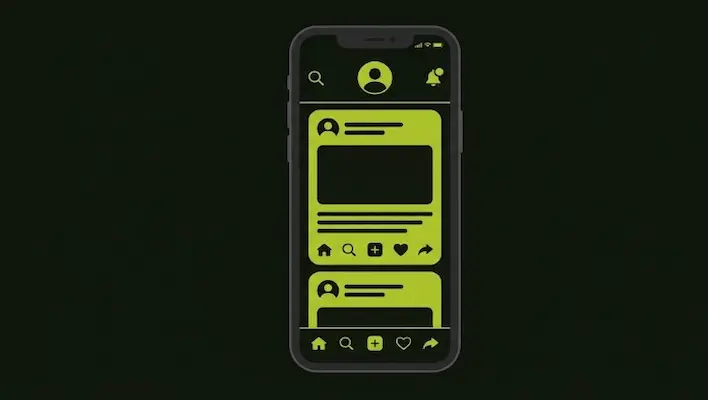
Social media has reshaped what users expect from any digital product, and web applications are no exception. People now expect real time updates, instant notifications, and personalized content feeds because that is the standard set by major social platforms. This expectation has pushed web application development toward more dynamic, interactive interfaces rather than static pages that only update on a manual refresh.
Social login has also become a common feature, letting users sign into a web application using an existing social account instead of creating a new password from scratch. This reduces friction during sign up and tends to increase completion rates for forms and registrations across most platforms.
Beyond design expectations, social media has become a direct source of user behavior data that shapes how applications are built. Many web applications now include built in sharing features, social proof elements such as reviews and testimonials, and content structured to perform well when shared externally. Personalization driven by algorithms, a pattern popularized by social feeds, has also become a common expectation in dashboards, recommendation engines, and content heavy applications well beyond social media itself.
Why Choose SkillsHeaven for Web Application Development in the UAE
SkillsHeaven is a UAE based digital agency that builds custom websites and web applications for businesses across Dubai, Sharjah, Abu Dhabi, Ajman, and the broader GCC region. Every project is handled fully in house, without outsourcing, which keeps quality consistent from the first planning call through to launch and ongoing support.
Whether the goal is a customer facing booking platform, an internal staff portal, or a healthcare focused application that needs strict data protection, the SkillsHeaven team combines technical development with a clear understanding of UAE market behavior, since a fast, functional application still needs the right SEO and local visibility strategy behind it to actually reach customers.
You can explore the full scope of web development services in Dubai offered by SkillsHeaven, or pair your new web application with a local SEO strategy built specifically for the UAE market so your application gets found by the right audience once it launches. To discuss your project directly with the team, visit the SkillsHeaven homepage or book a free strategy call.

M. Awais Khan is a Business Development and Digital Growth Strategist at SkillsHeaven, specializing in SEO, local search optimization, and performance-driven digital marketing. With experience supporting 100+ businesses, he develops and implements data-driven strategies that help companies increase online visibility, generate qualified leads, and drive sustainable revenue growth. His expertise spans Local SEO, Google Ads, social media marketing, and conversion-focused website optimization, ensuring every project is aligned with measurable business outcomes and long-term success.