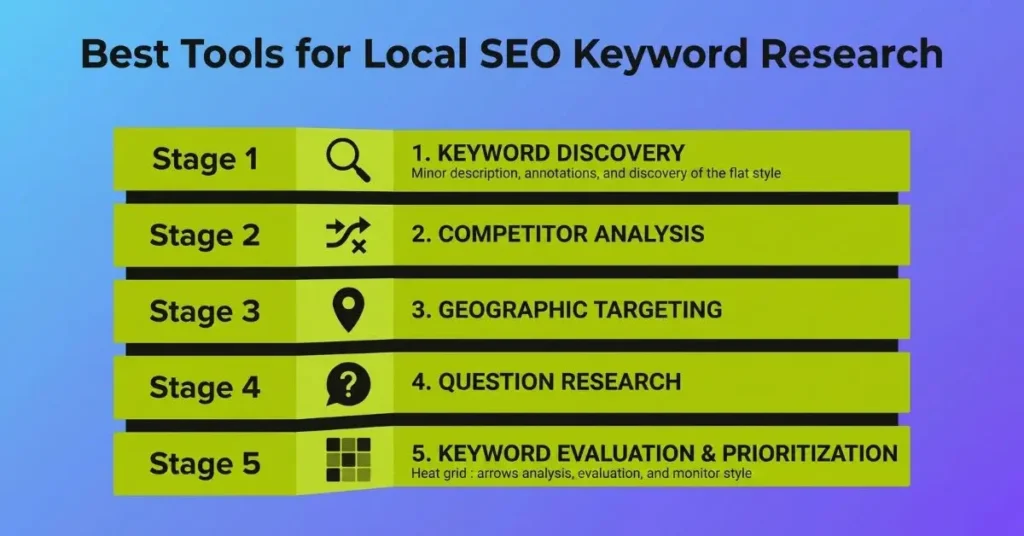
The best tools for local SEO keyword research are Google Keyword Planner, Ahrefs, Semrush, KWFinder, Moz, Local Falcon, and BrightLocal. Each one serves a specific purpose in your workflow. No single tool covers everything a local campaign needs. The right approach is to layer them: free tools for volume signals and real local data, paid tools for competitor depth and keyword difficulty, and local-specific tools for location-accurate ranking data.
For local SEO keyword research, use Google Keyword Planner to establish free volume baselines, your Google Business Profile Search Queries report for real local search data, Ahrefs or Semrush for competitor gap analysis and keyword difficulty, KWFinder for city-level and ZIP-level volume precision, and Local Falcon for hyperlocal rank accuracy and AI search phrase tracking. Stack them in layers for complete coverage.
Why Local Keyword Research Needs Different Tools Than General SEO
Most keyword tools are built around national or global search data. Local SEO works on a completely different scale. A keyword like “electrician” shows 4,400 monthly searches across the United Arab Emirates. What you actually need to know is how many people in Sharjah, Ajman search for “licensed electrician Ajman” or “emergency electrician near me.” That number might be 1,900. Both figures come from the same tool. Only one of them helps your client.
Local keyword research also has to account for something general SEO ignores entirely: the difference between how Google displays local results and how it ranks them.
Implicit vs. Explicit Local Keywords: Why Both Matter
Explicit local keywords contain a clear geographic term inside the query. Examples: “plumber in Austin,” “best roofing company Sharjah,” “AC repair Khor Fakkan.” These are straightforward to identify and target.
Implicit local keywords carry strong local intent without naming any location. Examples: “emergency dentist open now,” “pizza delivery near me,” “same day appliance repair.” Google uses IP address, device GPS, and search history to localize these results automatically. A user searching “emergency plumber” from their phone at 11pm gets results for plumbers in their city, not a national directory.
Location modifier types to collect for every client:
- City level: “roofing contractor Kalba”
- Neighborhood level: “coffee shop Dibba Al-Hisn”
- ZIP code level: “dentist 00000”
- Landmark or area level: “hotel near Umm Al Quwain”
- Proximity based: “electrician near me,” “open now”
- Urgency based: “emergency HVAC repair,” “24 hour locksmith”
Local Pack vs. Organic: Two Different Ranking Signals, Two Different Data Needs

A local SEO campaign targets two separate result types on the same page. The Google Local Pack is the map with three business listings that appears near the top of results for location-intent queries. It ranks based on Google Business Profile signals, NAP citation consistency, proximity to the searcher, review volume and quality, and E-E-A-T signals tied to the business entity. These are not the same signals that drive organic rankings.
Organic results below the map rank based on content relevance, on-page SEO, keyword targeting, internal linking, and backlink authority. A business can rank in the Local Pack for a keyword while its website sits on page four of organic results. The reverse is also true.
The Best Free Tools for Finding Local SEO Keywords
Free tools will not replace a paid platform for serious local SEO work. But used correctly, they give you enough data to build a strong seed list, validate local demand, and surface real search language before you open Ahrefs or Semrush.
Google Keyword Planner: Strong Starting Point with One Key Limitation
Google Keyword Planner (GKP) is a free tool inside Google Ads. It pulls data directly from Google’s own search system. You do not need to run ads to use it. For local SEO, the single most important step before pulling any data is setting the location filter to your target city, ZIP code, state, or service area radius. Without that step, GKP defaults to national averages and returns numbers that have no connection to your local market.
Two features make GKP particularly useful for local SEO:
Location filtering. Set the location to a specific city or ZIP code and GKP shows volume estimates for searches in that area. This gives you a starting baseline for local demand, even if the numbers are not precise.
Top of Page Bid. This column shows what advertisers pay per click to appear for a keyword in Google Ads. High bids indicate commercial intent. If plumbers in your city pay 18 Dhir per click for “water heater installation,” buyers are behind that search. Use Top of Page Bid to prioritize which local keywords deserve your client’s best service page content.
Now the limitation every practitioner needs to know. Ahrefs published an analysis of GKP data and found that 91% of keyword volume figures were overestimations. Around 54% were dramatic overestimations. GKP groups related queries together and reports a combined volume figure for the entire cluster under a single keyword. The result is inflated numbers that can make low-demand keywords look like high-opportunity targets.
Google Business Profile Search Queries: The Most Underused Free Source
This is the most overlooked keyword source in local SEO. Inside your Google Business Profile dashboard, the Performance section shows every search term people used to find your business on Google Search and Google Maps over the past six months.
These are not estimates. These are actual queries from actual local users who already found your listing or a listing in your category. No keyword tool can replicate that accuracy because no keyword tool has access to your specific business’s real search data.
For agency work, this is the first report to pull from any client account before opening any other tool. Export the list, remove branded searches, group remaining queries by service type and intent, and use them as your seed keywords for deeper research. If a term already brought someone to a client’s GBP listing, it is a confirmed local search query worth targeting on their website.
Google Search Console: Real Organic Click Data for Existing Pages
Google Search Console shows the actual queries that drove clicks to a client’s website from Google organic results. For clients with an existing site, the Search Console Performance report reveals which local keywords already send traffic, which ones get impressions but low clicks (a sign of poor title tags or weak rankings), and which position-four to position-ten keywords are close to page-one visibility.
Filter the Queries report by adding a city name or location modifier to find local-specific terms. Cross-reference high-impression, low-click queries with your keyword research tool to check difficulty and volume. These are often your fastest local ranking opportunities because the page already exists and Google already associates it with those terms.
Google Autocomplete and Related Searches
Type any service keyword into Google and watch the dropdown before you finish typing. Every suggestion in that dropdown comes from real searches other people made. These autocomplete suggestions reflect how local users phrase their actual queries, including informal language, urgency signals, and location modifiers.
After you open any result and scroll to the bottom of the page, Google shows eight related searches. These give you additional keyword variations at zero cost. Neither autocomplete nor related searches require a login or a tool subscription. They are the fastest way to understand the plain-English language your potential customers use, which is often very different from how a business describes its own services.
Google Trends for Local Seasonality and Demand Patterns
Google Trends does not give you keyword volume. Use it specifically to understand how demand for a local service rises and falls across seasons and geography. A roofing contractor sees searches spike after hail season. A tax professional peaks in March and April. A landscaping company climbs in spring and drops in winter.
Trends lets you compare interest by state, city, or metro area. Set the location to your target city and compare two or three keyword variations to see which phrasing gets more local interest. Use this to time GBP posts, plan seasonal content, and decide which service pages to refresh before demand peaks.
Customer Reviews and GBP Q&A: A Keyword Source Nobody Talks About
Your client’s Google reviews and the Questions and Answers section of their GBP listing contain real language from real local customers. When ten different reviewers describe a service using the same phrase, that phrase is how local buyers think about that service. When someone posts a question in the GBP Q&A section, that question is a search query someone typed or thought about typing.
Mine both sources for keyword ideas. Read the reviews of your client and their top three local competitors. Pull out repeated phrases, service descriptions, pain points, and problem statements. These become seed keywords, FAQ content topics, and natural language for service page body copy. This source is completely free, always local, and completely ignored by most practitioners.
AnswerThePublic and AlsoAsked: Question-Based and PAA Keywords
People Also Ask (PAA) boxes appear in Google results for a large share of local queries. Appearing inside the PAA box earns you visibility even when you do not rank in the top three organic positions.
AnswerThePublic generates question-format, preposition-based, and comparison-based keyword variations from any seed keyword. It organizes them by how, what, why, when, where, and which. AlsoAsked maps PAA question trees, showing which questions trigger follow-up questions inside the PAA box. This lets you understand the full chain of questions a local searcher moves through, not just the first one they ask.
Use both tools to build your FAQ section content, identify blog post topics with local intent, and create structured data markup (FAQ schema) for your service pages.
Ubersuggest: Entry-Level Competitor Research at Low Cost
Ubersuggest gives you keyword ideas, search volume estimates, keyword difficulty scores, and competitor domain keyword data on a free or low-cost plan. Its most practical feature for local SEO is the competitor keyword view. Enter a competitor’s domain and Ubersuggest shows which keywords that domain ranks for. Apply a location filter to narrow results to your target market.
Ubersuggest is not as deep as Ahrefs or Semrush for gap analysis and it is less precise on volume data. For practitioners who are not yet on a full paid SEO platform, it gives a usable starting point for local keyword discovery without significant budget commitment. Pair it with GKP and GBP Search Queries to cover the basics before upgrading to a paid platform.
The Best Paid Tools for Local SEO Keyword Research

Paid tools give you three things free tools cannot deliver: accurate keyword difficulty scores at the local level, deep competitor keyword data, and location-filtered volume at city or neighborhood granularity.
Ahrefs: Best for Competitor Gap Analysis and Client Keyword Research
Ahrefs is the strongest paid option for practitioners running local SEO for clients. Its advantage in a local context comes from three specific features used together.
Keywords Explorer with location filtering. Set your target country, enter seed keywords, and open the Matching Terms report. Apply the Include filter with your target city name, ZIP code, or neighborhood. This narrows thousands of keyword ideas to only those containing your location modifier. The color-coded intent labels (informational, commercial, transactional, navigational) let you sort large lists by funnel stage quickly.
Site Explorer for competitor keyword intelligence. Enter any local competitor’s URL and open the Organic Keywords report. Sort by position to see every keyword that URL ranks for in the top 10. This gives you a direct view of what is working for competitors in your client’s market without any guesswork.
Content Gap tool. Enter two or three competitor URLs against your client’s domain. The Content Gap report surfaces keywords that competitors rank for that your client does not appear for anywhere.
For keyword difficulty targeting, a KD score under 20 paired with commercial or transactional intent is the combination to prioritize for local service pages in the first 90 days of a campaign.
Semrush: Best All-in-One for Local SEO Research and Rank Tracking
Semrush covers keyword research, rank tracking, local listing management, and competitor analysis inside one platform. For local SEO, the Keyword Magic Tool is the primary research feature. Set your target country, enter a seed term, and type your city directly into the Include filter to surface location-specific variations.
Switch to the Questions tab inside the Keyword Magic Tool to pull question-format queries. These map directly to PAA content, FAQ sections, and blog post topics with local intent. This tab is one of the most underused features in Semrush for local SEO work.
The Local Toolkit inside Semrush handles listing management and citation tracking alongside your keyword research. For agencies managing multiple local clients, having rank tracking, keyword research, and listing management inside one dashboard reduces the number of tools you need to switch between during a client reporting session.
Moz Keyword Explorer and Moz Local: Reliable Data with Strong Local Features
Moz Keyword Explorer provides keyword ideas, monthly volume estimates, keyword difficulty scores, and organic click-through rate data. For local SEO, its neighborhood-level search data gives granular volume down to specific areas within a city, which is useful for clients targeting a specific district or borough rather than an entire metro area.
Moz Local is a separate tool focused on listing management and NAP consistency. It audits your client’s business listings across major directories, identifies inconsistencies in name, address, and phone number, and flags duplicate listings that could suppress Local Pack rankings. Use Moz Local as part of your citation audit workflow alongside keyword research rather than as a standalone tool.
KWFinder by Mangools: Best for Pinpoint City and ZIP Level Volume
KWFinder covers over 50,000 local SERPs and provides volume data at the city, ZIP code, county, and neighborhood level. That granularity is rare at its price point. For service-area businesses without a physical storefront, or for clients targeting specific neighborhoods rather than an entire city, KWFinder’s location filtering goes deeper than most tools at this price tier.
KWFinder pairs with SERPChecker, which shows the full live SERP for any keyword from any location without requiring a VPN or a device physically located in that city. If your client is in Phoenix and you need to see the exact SERP for “pool cleaning service Scottsdale” from a Scottsdale IP address, SERPChecker shows you that SERP in seconds. This confirms whether a Local Pack appears, who occupies it, and how strong the competition is before you commit to targeting that keyword.
Local Falcon: The Only Tool Built Specifically for Local SEO
Every other tool in this list was built for general SEO and adapted for local use. Local Falcon was built for local SEO from the ground up. That difference shows in what it measures.
The Local Keyword Tool uses AI reasoning and search intent labeling to score keywords by their potential to drive real local business results, not just keywords with the highest national volume. It also separates traditional local SEO keywords from AI search phrases, the natural-language queries users type into Google AI Overviews and conversational AI search tools. As AI-driven search changes how local results appear, tracking both types of keywords gives you visibility into both the current and emerging local search landscape.
The WYN score is Local Falcon’s proprietary metric. It combines keyword relevance, local search behavior patterns, and business-specific signals to score each keyword by its likelihood of driving actual local lead.
BrightLocal: Best for Citation and Reputation Data Alongside Keywords
BrightLocal is built for agencies managing local SEO across multiple clients. Its primary value is in citation building, review management, GBP auditing, and NAP consistency monitoring rather than keyword discovery. Include BrightLocal in your agency stack for citation gap reports, to identify directory listings a competitor has that your client lacks, and to monitor review volume and rating trends across platforms.
Pair BrightLocal with Ahrefs or Semrush for the keyword research layer. BrightLocal handles the local signals side of your campaign while your keyword tool handles search demand and content gap intelligence.
Keywordtool.io and Serpstat: Two More Options Worth Knowing
Keywordtool.io pulls keyword suggestions from Google Autocomplete, Google Trends, YouTube, and Bing. Its main advantage for local SEO is generating Autocomplete-based keyword ideas without requiring a Google Ads account. The free version shows keyword suggestions without volume data. The paid version unlocks search volume, CPC, and competition metrics. Use it as a supplementary brainstorming tool when you want to expand your seed list quickly with Autocomplete-based variations at scale.
Serpstat is an all-in-one platform covering keyword research, competitor analysis, rank tracking, and site auditing. For local SEO, its competitor domain keyword pull is the most relevant feature. Enter a competitor’s domain and Serpstat shows the keywords driving their organic traffic. Use it for competitor intelligence when your primary tools do not surface enough local keyword depth for a specific niche or market.
Best Tools for Local SEO Keyword Research: Quick Comparison
Use this table to match tools to the right stage of your local keyword research workflow.
| Tool | Cost | Best Used For | Local SEO Strength | Key Limitation |
| Google Keyword Planner | Free | Volume baseline and commercial intent | City and ZIP code filter, Top of Page Bid | Overestimates volume, no KD score |
| Google Business Profile Queries | Free | Real local search data from actual users | Confirmed local queries already finding the business | Only available for your own GBP |
| Google Search Console | Free | Organic click data and ranking opportunities | Shows actual keyword performance for existing pages | Only works for sites you own |
| Google Autocomplete | Free | Seed keyword discovery and natural language | Reflects real user phrasing in plain language | No volume or difficulty data |
| Google Trends | Free | Seasonal demand and location-based interest | State, city, and metro-level interest comparison | Not a volume measurement tool |
| Customer Reviews and GBP Q&A | Free | Plain language keyword mining | Real buyer language from your exact local market | Manual process, no automation |
| Ubersuggest | Free to low cost | Entry-level competitor keyword research | Competitor domain keyword view with location filter | Less precise than paid tools |
| AnswerThePublic | Free limited | Question and PAA keyword discovery | How, what, why, and when query variations | No volume on free tier |
| AlsoAsked | Free limited | PAA tree mapping and question clustering | Maps full PAA question chains for any topic | Limited free searches per day |
| Keywordtool.io | Free to paid | Autocomplete-based keyword expansion | Fast keyword ideas without a Google Ads account | Volume data locked behind paywall |
| Ahrefs | Paid | Competitor gap analysis and client research | Site Explorer, Content Gap, Matching Terms, intent labels | Higher cost, steeper learning curve |
| Semrush | Paid | All-in-one research, tracking, and listing management | Keyword Magic Tool, Questions tab, Local Toolkit | Can overwhelm single-location clients |
| Moz Keyword Explorer | Paid | Neighborhood-level volume and Priority Score | Granular local data, strong click-through estimates | Smaller keyword database than Ahrefs |
| Moz Local | Paid | NAP consistency and citation auditing | Directory audit and duplicate listing detection | Not a keyword discovery tool |
| KWFinder by Mangools | Paid | City-level and ZIP-level volume precision | 50,000 plus local SERPs, SERPChecker included | Smaller database than enterprise tools |
| Local Falcon | Paid | Hyperlocal rank accuracy and AI search tracking | WYN score, heatmap tracker, AI phrase tracking | Narrower feature set overall |
| Serpstat | Paid | Mid-range competitor and domain analysis | Competitor organic keyword pull at lower cost | Less granular local data than Ahrefs |
| BrightLocal | Paid | Citation building and reputation management | GBP auditing, citation gaps, review tracking | Not a primary keyword research tool |
How to Stack These Tools for Maximum Local Keyword Coverage
No single tool gives you everything. Every tool in this list has a blind spot. The practitioners who get the most complete local keyword data use a layered approach where each tool fills the gaps the previous one leaves open.
Layer 1: Free local data sources.
Start with Google Business Profile Search Queries and Google Search Console. These give you confirmed real-world local search data that no third-party tool can replicate. Add Google Autocomplete for natural language variations and AlsoAsked for PAA question mapping. Mine client reviews and GBP Q&A for buyer language. This layer costs nothing and gives you the most locally accurate inputs available.
Layer 2: Google Keyword Planner for volume baseline and commercial signals.
Run your confirmed seed keywords through GKP with the location filter set to your target city or ZIP. Use Top of Page Bid to flag commercial-intent keywords. Treat the volume numbers as directional signals, not precise figures. This layer validates that topics have real demand before you invest time in deeper research.
Layer 3: Ahrefs or Semrush for difficulty, competitor gaps, and volume accuracy.
Validate your top keyword candidates in a paid tool. Check KD scores, pull competitor organic keywords, run the Content Gap report, and confirm which keywords trigger a Local Pack. This is where you finalize your keyword priority list and map terms to specific pages on the client’s site.
Layer 4: KWFinder for city or neighborhood-level volume precision.
For clients targeting specific neighborhoods, ZIP codes, or suburbs rather than a full city, use KWFinder to pull granular local volume data. Use SERPChecker to view the exact local SERP from the target location and confirm Local Pack presence and competition level.
Layer 5: Local Falcon for hyperlocal rank visibility.
After the campaign launches, use Local Falcon’s heatmap tracker to monitor where the client ranks for target keywords across different zones of their service area. Use the WYN score to prioritize which keywords to focus citation building and GBP optimization efforts on.
This five-layer stack covers free volume baseline, real local signal data, competitor intelligence, granular city-level volume, and location-accurate rank tracking. Each layer is additive. None of them replaces the others.
FAQ: Local SEO Keyword Research Tools
What is the best free tool for local SEO keyword research?
Google Keyword Planner is the strongest free option because it pulls data directly from Google. Always set the location filter to your target city or ZIP code before running any searches. Pair it with your Google Business Profile Search Queries report, Google Search Console, Google Autocomplete, and AlsoAsked for question-based keyword ideas. Together these free sources give you a solid local keyword foundation without any subscription cost.
Is Google Keyword Planner accurate enough for local SEO?
Not as your only tool. Ahrefs published an analysis showing GKP overestimates volume for 91% of keywords by grouping related queries under a single figure. Use GKP for topic-level demand validation and commercial intent signals through the Top of Page Bid metric. Then validate volume accuracy and keyword difficulty with Ahrefs or Semrush before finalizing your keyword priority list.
How do I find keywords my local competitors are ranking for?
Enter a competitor’s URL into Ahrefs Site Explorer and open the Organic Keywords report. Sort by position to see their top-ranking terms. Then run the Content Gap tool with your client’s domain against two or three competitor URLs. The report shows every keyword those competitors rank for that your client does not appear for. That list is your content build priority for the next campaign cycle.
Can I use ChatGPT for local keyword research?
ChatGPT is useful for brainstorming seed keyword ideas and generating city-specific service variations quickly. It does not pull from a live keyword database. Any volume or difficulty figures it provides are not real data. Use ChatGPT to build your initial seed list, then validate every keyword inside Ahrefs, Semrush, or KWFinder before committing to any content or page build.
How do I find “near me” keywords for a local business?
Near me keywords are implicit local keywords. They rarely surface in keyword tools with useful city-level volume data because the volume is spread across thousands of location variations. Instead, confirm that your target service keywords trigger a Local Pack in Google, which means Google already treats them as proximity-intent searches. Then optimize your client’s GBP, citation consistency, and service page content for those terms.
Should I target city-level or neighborhood-level keywords?
Target both, but in order. Build city-level service pages first because they carry higher volume and establish your primary local authority signals. Once those pages gain traction in rankings, add neighborhood-level and ZIP-level content as supplementary service pages or location-specific blog posts.
How do I check local keyword intent without being physically in that location?
Use the Valentin.app SERPChecker free Google Location Changer. Enter your target keyword, select the target city, and the tool shows the live SERP exactly as it appears from that location, including whether a Local Pack is present and who occupies the top three positions.

M. Awais Khan is a Business Development and Digital Growth Strategist at SkillsHeaven, specializing in SEO, local search optimization, and performance-driven digital marketing. With experience supporting 100+ businesses, he develops and implements data-driven strategies that help companies increase online visibility, generate qualified leads, and drive sustainable revenue growth. His expertise spans Local SEO, Google Ads, social media marketing, and conversion-focused website optimization, ensuring every project is aligned with measurable business outcomes and long-term success.