

To do local SEO for multiple locations, you need a dedicated page for each location, a fully optimized Google Business Profile for every site, consistent business information across the web, and locally relevant content that speaks to each area individually rather than reusing the same text everywhere. Skill Heavens helps businesses build exactly this kind of structure, and this guide walks through every step of how to do local SEO for multiple locations the right way.
Why Multiple Locations in Local SEO Need a Different Approach
Multiple locations in local SEO create a unique challenge that single location businesses never face. Search engines need to understand that your business genuinely serves several distinct areas, not just one main address with a few extra mentions sprinkled in. Get this wrong, and your locations end up competing against each other or, worse, never showing up in local search results at all.
The good news is that the same ranking factors that apply to one location apply to many, just multiplied. Relevance, distance, and prominence still drive who shows up in the map pack and the local organic results. The work simply needs to be repeated and tailored for every single location your business operates in.
How to Optimize Location Pages for Local SEO
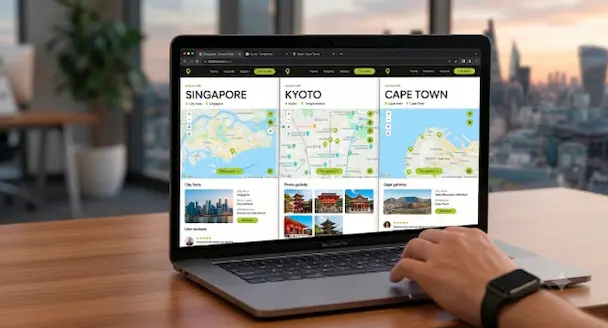
Optimizing location pages for local SEO starts with giving every site its own dedicated page rather than listing all your locations on one general page. Each page should read as if it were written specifically for that city or neighborhood, covering the services offered there, the team or staff at that branch, local landmarks or service areas, and genuine local context that a copy paste page with the city name swapped could never replicate.
Here’s what a strong, well optimized location page typically includes:
- A unique title tag and meta description built around that specific city or area
- An H1 that clearly states the service and the location together
- Consistent name, address, and phone number, matching what appears on the Google Business Profile and citations
- Embedded Google Maps showing the exact location
- Local schema markup, specifically LocalBusiness schema, so search engines can confirm the address, hours, and service area
- Genuine local content, such as service areas covered, nearby landmarks, or testimonials from customers in that city
- Clear calls to action, like a phone number or booking link specific to that branch
Skipping any of these steps tends to leave a location page thin and indistinguishable from the others, which makes it harder for that page to earn its own ranking.
Setting Up Google Business Profiles for Every Location
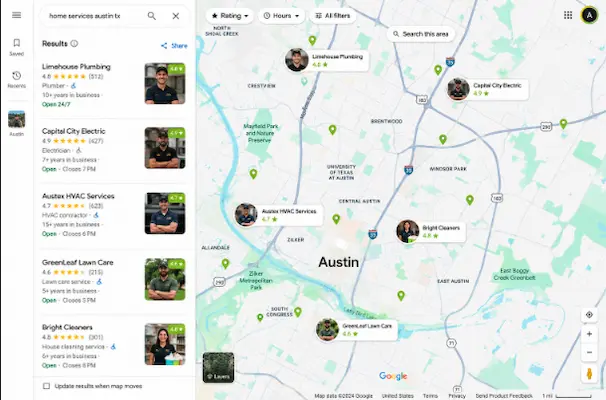
A separate, fully completed Google Business Profile for each location is one of the most important pieces of multi-location SEO. Every profile needs accurate categories, complete service lists, current hours, and photos specific to that branch. Choosing the same primary category across all locations keeps things consistent, while secondary categories can be adjusted slightly based on what each location actually offers.
Review management plays a bigger role here than many businesses expect. Replying to reviews with specific, location relevant details helps both customers and search engines confirm what each branch specializes in, and it adds fresh, unique content to a profile that templated location pages often lack.
Keeping NAP Consistency Across Every Citation
Name, address, and phone number consistency, usually shortened to NAP, needs to stay identical across your website, your Google Business Profiles, and every directory or citation site your business appears on. When this information varies even slightly between sources, search engines struggle to confirm which listings actually belong to the same trustworthy business, which weakens the ranking potential of every location involved.
Building citations on niche relevant, locally recognized directories for each area adds another layer of trust signal, especially when those citations are unique to that location rather than mirrored across all branches.
Choosing the Right Website Structure for Multiple Locations
Most multi-location businesses choose between separate domains, subdomains, or subfolders for their location pages, and subfolders, such as a structure like yourbusiness.com/locations/city, tend to perform the strongest. This setup keeps all your SEO authority consolidated under one domain instead of splitting it across several, making link building, content, and technical SEO efforts compound together rather than working in isolation.
Avoiding Duplicate Content Across Location Pages
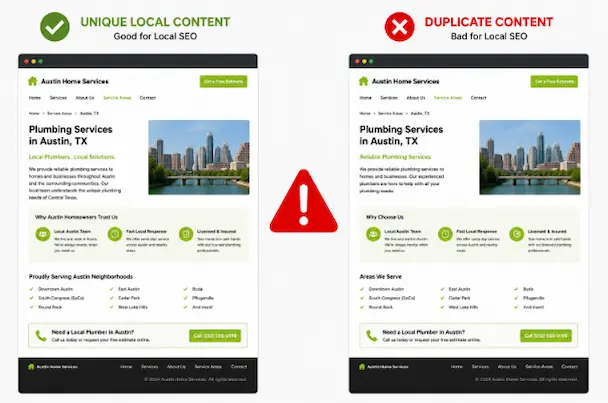
One of the most common mistakes in multi-location SEO is publishing the same content across every location page with only the city name changed. Search engines recognize this pattern quickly, and pages that read as templated rarely hold strong rankings for long. Writing distinct content for each location, even if the services offered are identical, gives search engines and AI driven search tools the unique signals they need to treat each page as genuinely relevant to its own area.
Frequently Asked Questions
How do I do local SEO for multiple locations?
Create a dedicated page and Google Business Profile for each location, keep your name, address, and phone number consistent everywhere, and write unique, locally specific content for every site rather than duplicating the same page across locations.
Should each location have its own website or one shared website?
A single website using subfolders for each location generally performs better than separate domains, since it keeps your SEO authority consolidated instead of split across multiple sites.
How many Google Business Profiles do I need for multiple locations?
You need one Google Business Profile per physical location, each fully completed with accurate categories, hours, and services specific to that branch.
Does duplicate content hurt multi-location SEO?
Yes, using the same content across location pages with only the city name changed weakens rankings, since search engines favor pages with genuinely unique, locally relevant content.

Atif Khan is a highly experienced Local SEO Expert and Strategic SEO Consultant who helps businesses turn their websites into powerful lead-generating assets. With hands-on experience optimizing and ranking over 100 websites across competitive industries, he specializes in building data-driven SEO systems that improve local search visibility, attract qualified traffic, and convert visitors into customers. His expertise spans Google Business Profile optimization, technical SEO, keyword research, content strategy, and conversion-focused website optimization, ensuring every project is aligned with measurable business outcomes. Atif focuses on creating complete local search ecosystems, combining website authority, relevance, and trust signals to help businesses dominate in their target locations. Beyond rankings, he develops scalable growth strategies that drive calls, inquiries, and long-term revenue. His approach is rooted in ethical, white-hat SEO practices, continuous optimization, and performance tracking, ensuring sustainable results. As a consultant, he works closely with businesses and agencies to align SEO with revenue goals, improve digital presence, and build long-term organic acquisition systems.