
A google ads keywords strategy works when you choose terms that match real buyer intent, organize them into tightly themed ad groups, and continuously remove the searches that waste your budget through negative keywords. That is the entire concept in one sentence, but getting it right takes a bit more nuance, and that is exactly what this guide breaks down.
Most accounts do not fail because the product is wrong or the offer is weak. They fail because the keyword list was built once and never touched again. Search behavior shifts every month, competitors change their bids, and new ways of phrasing the same intent show up constantly. A google ads keywords strategy is not a one time setup task. It is an ongoing discipline, and once you treat it that way, your cost per click drops and your quality score climbs on its own.
What Makes a Strong Google Ads Keywords Strategy
A solid foundation starts with understanding that every keyword you add is a bet on what someone is thinking the moment they type into the search bar. Get that bet right, and your ad shows up exactly when someone is ready to act. Get it wrong, and you pay for attention from people who were never going to buy anything.
The strongest accounts share three habits. They group keywords by intent rather than by product name alone. They review search term reports weekly, not quarterly. And they treat negative keywords as seriously as the keywords they are actively bidding on. None of this is complicated, but it does require consistency, which is where most advertisers quietly drop the ball.
How to Add Keywords to Google Ads
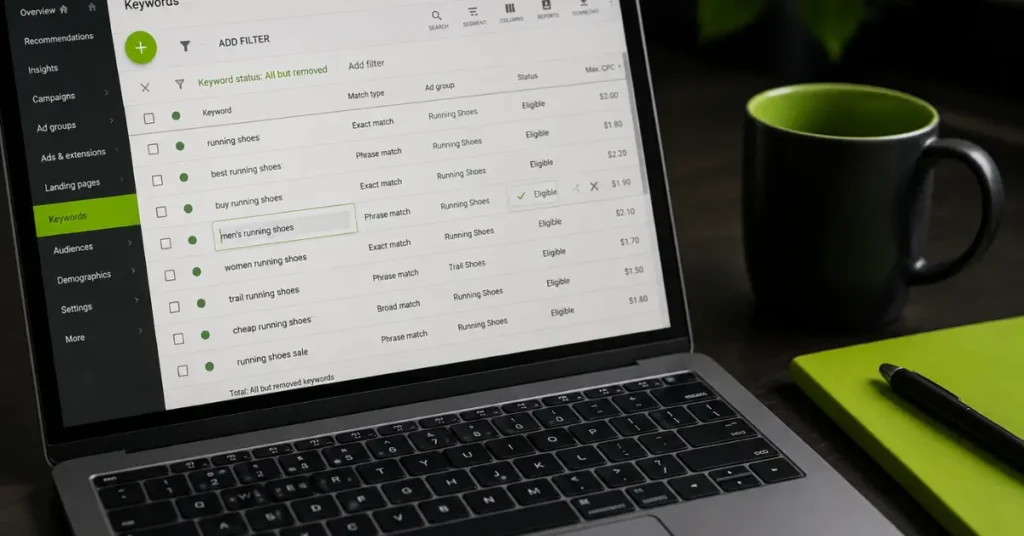
Adding keywords is the easy part once you know where to look. Open your campaign, choose the ad group you want to edit, and click the Keywords tab on the left panel. From there, select the plus button and type or paste your list directly into the box. Each line becomes a separate keyword, and you can assign match types right inside that same box using quotation marks for phrase match or square brackets for exact match.
If you already have a spreadsheet of researched terms, the upload option saves time. Just format the file with one keyword per row, save it as a CSV, and upload it under the same Keywords section. Google will scan the list for policy issues before it goes live, so check back after a few minutes to confirm everything was approved.
How to Edit Keywords in Google Ads Campaign
Editing existing keywords follows a similarly simple path. Inside the Keywords tab, click directly on the keyword text you want to change. A small edit box appears, letting you adjust the wording, the match type, or the bid without deleting and recreating the entry. This matters because deleting a keyword resets its performance history, while editing it in place keeps the data intact for reporting.
For bulk changes, the Google Ads Editor desktop tool is worth installing if you manage more than one campaign. It lets you make sweeping changes offline, then push them live all at once, which is far faster than clicking through dozens of ad groups one at a time inside the browser interface.
How to Change Keywords in Google Ads Without Losing Momentum
Changing a keyword is different from simply pausing it. If a keyword is underperforming but the underlying intent is still valuable, the smarter move is usually to adjust the match type rather than delete it outright. A broad match term that is pulling in irrelevant traffic can often be tightened into phrase match, which keeps the relevant searches while cutting off the noise.
When you do need to replace a keyword entirely, add the new version first and let it gather a few days of data before removing the old one. Running them side by side for a short window prevents a sudden dip in impressions while Google’s system relearns which terms are working.
How Many Keywords Should I Use for Google Ads
There is no universal number, but there is a useful range. Most well structured ad groups perform best with somewhere between five and twenty closely related keywords. Anything fewer than that and you risk limiting your reach unnecessarily. Anything more and the ad group starts losing focus, which drags down relevance scores across the board.
The right count depends heavily on your budget and your niche. A local service business with a modest monthly spend should stay lean, often landing closer to the lower end of that range so each keyword gets enough impressions to produce meaningful data. A large ecommerce catalog with hundreds of product variations can justify a much bigger total list, but even then, the advice holds at the ad group level: keep each individual group tight and themed.
Is Adding Too Many Keywords Bad for Google Ads
Yes, in most cases it works against you rather than for you. A bloated keyword list spreads your budget thin across terms that rarely get enough traffic to optimize properly, and it makes your search term reports nearly impossible to review in a meaningful way. Quality score also tends to suffer when ad groups contain dozens of loosely related terms, since Google reads that as a signal of weak relevance between the keyword, the ad copy, and the landing page.
The better approach is to start with a focused list built around genuine search intent, watch performance for a few weeks, and expand only when the data justifies it. Letting performance guide growth, rather than guessing every possible variation upfront, keeps the account lean and the budget working harder.

What Are Negative Keywords in Google Ads
Negative keywords are terms you tell Google not to show your ad for, even if they are technically related to your other keywords. They exist specifically to filter out the searches that look relevant on the surface but never lead to a sale or a lead. A bakery bidding on “cake delivery” might add “recipe” as a negative keyword, since someone searching for a recipe wants to bake their own cake, not buy one.
This single feature is one of the most underused tools in the entire platform. Many advertisers set their positive keyword list once and forget that the negative side needs just as much attention, if not more, since it directly controls how much of your budget gets wasted on the wrong audience.
How to Add Negative Keywords in Google Ads
Adding a negative keyword takes the same basic steps as adding a regular one. From the campaign or ad group level, navigate to the Negative Keywords section in the left menu, click the plus icon, and enter the terms you want excluded. You can apply these at the ad group level for tighter control over a single theme, or at the campaign level when the exclusion should apply everywhere.
For accounts managing several campaigns at once, a shared negative keyword list is far more efficient. Build the list once under Tools and Settings, then attach it to every relevant campaign so updates only need to happen in one place instead of being repeated across the account.
How to Find Negative Keyword List in Google Ads
The most reliable source for new negative keywords is your own search terms report, found under the Insights and Reports section of any active campaign. This report shows the exact phrases people typed before your ad appeared, and scanning it regularly will reveal patterns of irrelevant traffic that need to be excluded going forward.
Beyond your own data, Google Keyword Planner can also surface terms worth excluding before you even launch a campaign, particularly when you notice keyword suggestions that sound close to your offering but actually describe something different, like free alternatives, job searches, or DIY content when you are selling a paid service.
Can I Use Competitor Brand Keywords in Google Ads
Bidding on a competitor’s brand name is legal in most regions and is a common tactic, though it comes with real tradeoffs worth weighing before you commit a budget to it. Google generally permits advertisers to bid on competitor trademarks as keywords, provided the ad text itself does not misuse the trademark or create confusion about who is actually running the ad.
That said, competitor terms tend to carry a higher cost per click and a lower conversion rate than your own branded terms, since the searcher already has a specific company in mind. It can work as a smaller, carefully monitored slice of a broader strategy, but it rarely deserves the same budget priority as keywords built around your own offering and the generic terms your ideal customers actually search for.

How to Do Keyword Research for Google Ads
Keyword research starts before you ever open the Ads platform. Begin by listing the core categories of your business the way a customer would describe them, not the way your internal team might label them. From there, expand each category into the specific phrases someone would type when they are close to making a decision.
Google Keyword Planner remains the most direct source for search volume and competition data, since it pulls straight from Google’s own search index. Pairing it with a tool like Google Trends helps you spot seasonal patterns and rising interest before a term becomes expensive, giving you a window to claim relevant traffic early rather than competing for it once everyone else has noticed the same opportunity.
How to Research Keywords for Google Ads Using Competitor Insight
Beyond your own brainstorming, looking at what is already working in your space adds a layer of validation that pure guesswork cannot. Searching the terms you think your audience uses and noting which ads consistently appear over several days gives you a strong signal about which keywords are profitable enough for others to keep bidding on repeatedly.
Doing in depth competitor analysis the right way means studying the angle of their ad copy and the structure of their offers, then building something distinct rather than copying their wording outright. The goal is to identify gaps they have left uncovered, whether that is a more specific long tail phrase or an intent they have not addressed in their messaging, and building your list around filling that space.
What Happens When You Pause a Keyword in Google Ads
Pausing a keyword stops it from triggering your ad immediately, but it does not delete the keyword or erase its historical performance data. This makes pausing the safer first step whenever you are unsure about removing a term permanently, since you can always resume it later if circumstances change, such as a seasonal product coming back into demand.
A paused keyword also stops accumulating impressions and clicks while it sits inactive, so your overall account metrics will shift slightly once it goes quiet, particularly if that keyword was previously driving a meaningful share of traffic. Reviewing the impact a few days after pausing helps confirm whether the change improved your average cost per click without sacrificing the volume you actually needed.
How to Use Google Keyword Planner Without Creating an Ad
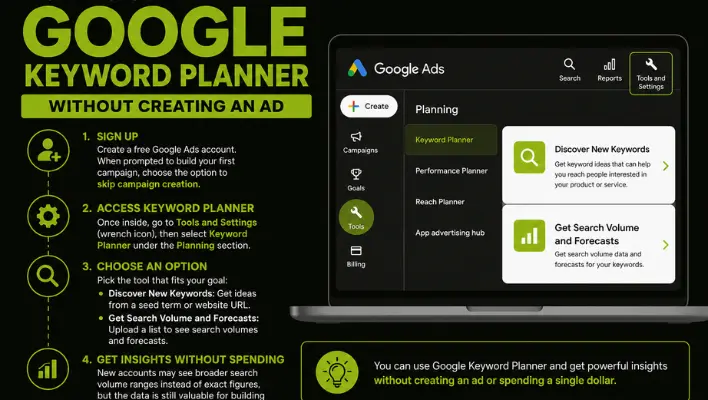
You can absolutely use Keyword Planner without ever launching a live ad, and this is one of the most common questions from people who want the research data without the spend. Sign up for a free Google Ads account, and when prompted to build your first campaign, look for the option to skip campaign creation rather than walking through the full setup.
Once inside, head to Tools and Settings, then select Keyword Planner under the Planning section. From there you can choose Discover New Keywords to generate fresh ideas from a seed term or website URL, or Get Search Volume and Forecasts if you already have a list and just want the numbers behind it. Accounts with no campaign history sometimes see broader search volume ranges instead of exact figures, but the tool still provides enough direction to shape a solid keyword list before spending a single dollar.
Building Ad Groups That Actually Convert
Once your research is done, organization becomes the next priority. Group keywords by the specific intent behind the search rather than by loosely related topics. A campaign selling project management software, for example, should separate people searching for free tools from people actively comparing paid plans, since the messaging each group needs is completely different.
This level of structure feeds directly into quality score, which in turn lowers your cost per click across the entire campaign. Google rewards tightly themed ad groups because they make it easier to serve a relevant ad the moment someone searches, and that relevance is ultimately what the entire auction system is designed to measure.
Match Types and Where Each One Fits
Broad match casts the widest net and works best when paired with strong negative keyword coverage and a bidding strategy that can react to performance automatically. Phrase match sits in the middle, capturing the meaning behind a search while still respecting word order to some degree. Exact match gives you the tightest control and tends to suit your highest converting terms, the ones you already know perform and simply want to protect from unrelated traffic.
A balanced account usually blends all three rather than relying on just one. Exact match keywords anchor your proven winners, phrase match expands reach around those same themes, and a carefully watched layer of broad match helps surface new opportunities you might not have thought to add manually.

Keeping the Strategy Alive Long Term
A google ads keywords strategy only stays effective if someone is actually maintaining it. Set a recurring weekly check on the search terms report, a monthly review of which keywords deserve a bid increase or a pause, and a quarterly look at whether new match type combinations are worth testing. None of these tasks take long individually, but skipping them for a few months is usually how accounts end up bloated and underperforming without anyone noticing right away.
If you want a deeper technical breakdown straight from the source, Google’s own guidance on building a keyword list walks through additional nuance around grouping and refinement that pairs well with everything covered here.
If you would rather have an experienced team build and manage this for you, our specialists at Skills Heaven handle the entire process, from initial research through ongoing optimization, so your account improves every month.

M. Awais Khan is a Business Development and Digital Growth Strategist at SkillsHeaven, specializing in SEO, local search optimization, and performance-driven digital marketing. With experience supporting 100+ businesses, he develops and implements data-driven strategies that help companies increase online visibility, generate qualified leads, and drive sustainable revenue growth. His expertise spans Local SEO, Google Ads, social media marketing, and conversion-focused website optimization, ensuring every project is aligned with measurable business outcomes and long-term success.