Alt text helps SEO, and writing it correctly means describing the image clearly, working your keyword in naturally, and keeping the description short enough to stay useful for both search engines and screen readers. If you have been searching for a clear answer on how to write alt text for images for SEO, this guide walks through exactly what alt text is, why it matters, and how to write it correctly across every type of image on your website. We help businesses put this kind of technical detail into practice, since small elements like alt text often make a real difference once a site is fully optimized.
What Is Image Alt Text in SEO?
Alt text, short for alternative text, is a written description added to the HTML code behind an image. It appears in place of the image if the file fails to load, and it gets read aloud by screen readers so people with visual impairments understand what the image shows. In code, it looks like this:
<img src=”office-team-meeting.jpg” alt=”Marketing team reviewing a campaign report during a meeting”>
When people ask what is image alt tag in SEO, they are usually referring to the same attribute, since alt tag and alt text are used interchangeably across the industry, even though alt text is technically the more accurate term. Every meaningful image on a page benefits from this description, since it gives search engines the context they cannot pull directly from a photograph or graphic.
Does Alt Text Help SEO?
Yes, alt text helps SEO in a few clear ways, and this answers several closely related questions people search for: does alt text improve SEO, do image alt tags help SEO, and is alt text good for SEO. The short answer to all three is the same. Alt text does not carry the same ranking weight as a title tag, but it plays a real role in how search engines understand and surface content.
Search engines cannot see images the way people do, so they rely on surrounding signals, including alt text, to understand what an image contains and how it relates to the page. This directly affects whether an image can appear in Google Images or an image pack within regular search results, both of which bring additional organic visitors to a website. Google’s own guidance on image SEO best practices confirms that alt text remains one of the most important signals for helping search engines understand and rank images correctly.
So does alt text affect SEO in a measurable way? Businesses that add descriptive alt text across their image library often see a noticeable increase in image search traffic over time, since properly described images become eligible to rank for relevant search queries they would otherwise miss entirely. People also ask “Does alt text help with SEO beyond images themselves?”. The answer to this question is “Yes, since it also reinforces the topical relevance of the surrounding page content, giving search engines another data point that supports what the page is actually about.”

How to Write Alt Text for Images for SEO
Here is a practical, step by step approach to how to write alt text for images for SEO that balances search visibility with genuine accessibility.
Step 1: Describe What the Image Actually Shows
Start with the specific content of the image rather than a vague label. Instead of writing “team photo,” describe what is happening: “Five person marketing team collaborating around a laptop during a strategy session.” This level of detail helps both search engines and screen reader users understand the image accurately.
Step 2: Include Your Keyword Naturally
Learning how to write SEO friendly alt text for your images often comes down to this single habit: include the page’s target keyword where it fits naturally, without forcing it into every image. If a page focuses on “custom leather bags,” an image showing the product might use alt text like “Handstitched brown leather tote bag with brass hardware,” which reads naturally while still reinforcing the page’s topic.
Step 3: Keep It Concise
Alt text works best when it stays focused, generally within one clear sentence. Long, cluttered descriptions become harder for screen readers to convey quickly and rarely add extra SEO value beyond a certain point. Aim for enough detail to be useful, then stop.
Step 4: Skip Phrases Like “Image Of” or “Picture Of”
Screen readers already announce that an element is an image, so starting the alt text with “image of” or “photo of” is redundant. Jump straight into the description instead.
Step 5: Match the Context of the Page
The same photograph might need different alt text depending on where it appears. A photo of a hiking trail might read “Wide dirt trail winding through a pine forest” on a general travel page, but the same image on a hiking gear page might read “Hiking trail suited for lightweight trail running shoes,” since the surrounding content changes what matters most to the reader.
Step 6: Leave Purely Decorative Images Empty
Not every image needs a full description. A purely decorative border or background graphic that adds no informational value can carry an empty alt attribute, written as alt=””, which tells screen readers to skip past it cleanly rather than reading an unhelpful label out loud.
If you have been wondering how to write image alt text for SEO for a large site with hundreds of product photos, the same six steps apply at scale, though many businesses use templates that combine the product name with a key attribute, such as color or material, to keep the process consistent without becoming repetitive.

What to Avoid When Writing Alt Text
A few habits consistently weaken alt text, even when the intention behind them is good.
Keyword stuffing. Cramming multiple keywords into one image’s alt text reads unnaturally and can make search engines question the credibility of the page as a whole.
Using the file name as the description. Alt text like “IMG_4521.jpg” or “photo1” tells search engines and screen readers nothing useful about the image.
Writing alt text that duplicates nearby text exactly. If a caption already explains the image in detail, the alt text should add value rather than repeat the same sentence word for word.
Skipping alt text entirely. Leaving the attribute blank on meaningful images removes an easy opportunity for both accessibility and search visibility, and it can also create compliance issues under accessibility standards in many regions.
Describing how an image looks instead of what it means. A photo of a company founder does not need “smiling woman in a blue blazer standing near a window.” It needs the information that actually matters in context, such as “Founder and CEO presenting quarterly results to the team.”
Alt Text Examples for Different Image Types
Different image types call for slightly different approaches.
- Product photos: “Stainless steel french press with wooden handle, eight cup capacity”
- Team or people photos: “Customer support specialist assisting a client over a video call”
- Charts and graphs: “Bar chart showing a 34 percent increase in organic traffic over six months”
- Logos: “Company logo featuring a blue mountain outline above the brand name”
- Screenshots with text: Include the visible text in the alt description, since screen readers cannot read text embedded inside an image file
- Icons that link to another page: Describe the destination rather than the icon itself, such as “Link to the pricing page” instead of “Arrow icon”
For more complex visuals like infographics, a shorter alt text paired with a fuller explanation in the surrounding page content usually works better than trying to describe every detail inside the alt attribute itself.
Alt Text and Accessibility Compliance
Alt text sits at the intersection of two goals that often get treated as separate projects: search visibility and accessibility. In reality, they support each other directly. A website with well written alt text tends to perform better for users relying on screen readers, and that same clarity is exactly what search engines are looking for when they try to understand an image.
This overlap also carries a compliance dimension. In many regions, missing alt text on meaningful images is treated as an accessibility gap under standards such as the Web Content Accessibility Guidelines. A detailed resource from Section508.gov on writing meaningful alt text breaks down how to describe photos, logos, charts, and text embedded inside images in a way that satisfies accessibility requirements, and the same principles line up closely with what search engines reward. Businesses that treat alt text as a shared accessibility and SEO task, rather than an SEO only checkbox, tend to end up with descriptions that hold up well under both lenses.
How Keyword Research Shapes Better Alt Text
Alt text works alongside other on page elements rather than replacing them. A strong keyword research process helps identify which terms are worth reinforcing through alt text in the first place, since alt text should always reflect real search intent rather than guesswork. Businesses that build a structured keyword research approach tend to write more accurate, higher performing alt text, since they already know which terms matter most for each page, rather than guessing which phrase might be worth including.
How to Add Alt Text in WordPress and Other CMS Platforms
Adding alt text rarely requires touching raw HTML, since most platforms include a dedicated field for it.
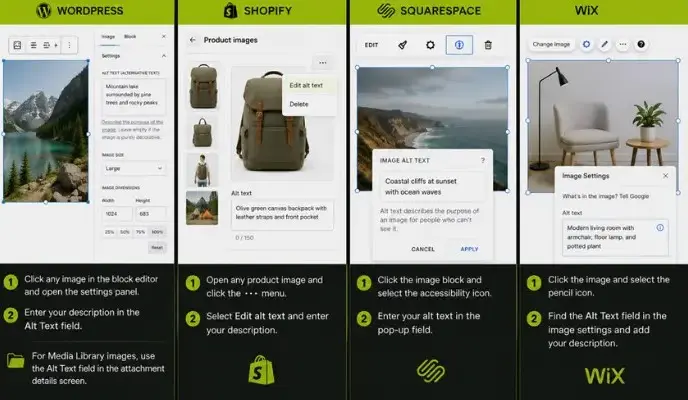
In WordPress, click any image inside the block editor, then open the block settings panel on the right side of the screen. The Alt Text field sits directly beneath the image preview, ready for a description to be typed in. For images uploaded through the Media Library, the same field appears in the attachment details screen.
In Shopify, open any product image and select Edit alt text from the image options, then type the description directly into the field provided.
In Squarespace, click an image block, select the accessibility icon, and enter the alt text in the pop up field.
In Wix, click the image, select the pencil icon to open image settings, then look for the Alt Text field within the settings panel.
Across every platform, the same principle applies: a short, accurate, keyword aware description in that alt text field is what search engines and screen readers both rely on.
Frequently Asked Questions
Does alt text help SEO?
Yes. Alt text helps search engines understand image content, which supports image search rankings and reinforces the overall relevance of the surrounding page.
Is image alt text important for SEO?
Yes, particularly for websites that rely on product photos, infographics, or visual content that could otherwise attract organic traffic through Google Images.
Does adding alt text boost SEO significantly?
It contributes a meaningful, measurable benefit, especially for image heavy sites, though it works best as part of a wider on page SEO strategy rather than a standalone tactic.
How does alt text help SEO according to Google’s own guidance?
Google’s documentation describes alt text as one of the most important image metadata signals, since it helps the search engine understand what an image depicts and how it connects to the page’s topic.
How long should SEO friendly alt text be?
There is no strict limit, but a single clear sentence, roughly 8 to 15 words, tends to balance accessibility and search relevance well for most images.
Do decorative images need alt text?
No. Purely decorative images can use an empty alt attribute so screen readers skip them, since they carry no informational value for the reader.
Should alt text be different from the image caption?
Generally yes. A caption often adds commentary or context for a sighted reader, while alt text should focus purely on describing the image itself, so the two rarely need to say exactly the same thing.
Final Thoughts
Getting comfortable with how to write alt text for images for SEO comes down to a simple habit: describe the image accurately, include relevant keywords where they fit naturally, and keep every description genuinely useful rather than stuffed for search engines alone. This small piece of on page detail supports accessibility, strengthens image search visibility, and adds another layer of context that helps search engines understand a page more completely. Pairing strong alt text with a broader SEO strategy and technical optimization plan, alongside a well structured local SEO strategy, gives a website a much stronger foundation for organic growth over time.

Atif Khan is a highly experienced Local SEO Expert and Strategic SEO Consultant who helps businesses turn their websites into powerful lead-generating assets. With hands-on experience optimizing and ranking over 100 websites across competitive industries, he specializes in building data-driven SEO systems that improve local search visibility, attract qualified traffic, and convert visitors into customers. His expertise spans Google Business Profile optimization, technical SEO, keyword research, content strategy, and conversion-focused website optimization, ensuring every project is aligned with measurable business outcomes. Atif focuses on creating complete local search ecosystems, combining website authority, relevance, and trust signals to help businesses dominate in their target locations. Beyond rankings, he develops scalable growth strategies that drive calls, inquiries, and long-term revenue. His approach is rooted in ethical, white-hat SEO practices, continuous optimization, and performance tracking, ensuring sustainable results. As a consultant, he works closely with businesses and agencies to align SEO with revenue goals, improve digital presence, and build long-term organic acquisition systems.