
A title tag in SEO is an HTML element placed inside the head section of a webpage that specifies the clickable headline shown in search engine results pages, browser tabs, and social media link previews. It is the single most visible on-page SEO signal your page sends to both search engines and real human users, and getting it right can be the difference between a page that ranks and gets ignored versus one that consistently earns clicks and drives organic traffic.
Understanding what is a title tag in SEO is not just foundational knowledge. It is one of the most actionable optimizations available to any website owner, marketer, or content team, because a well-written title tag directly influences how search engines categorize your content and how strongly users are compelled to choose your result over every competing listing on the page.
What Are Title Tags in SEO? The Technical and Practical Definition
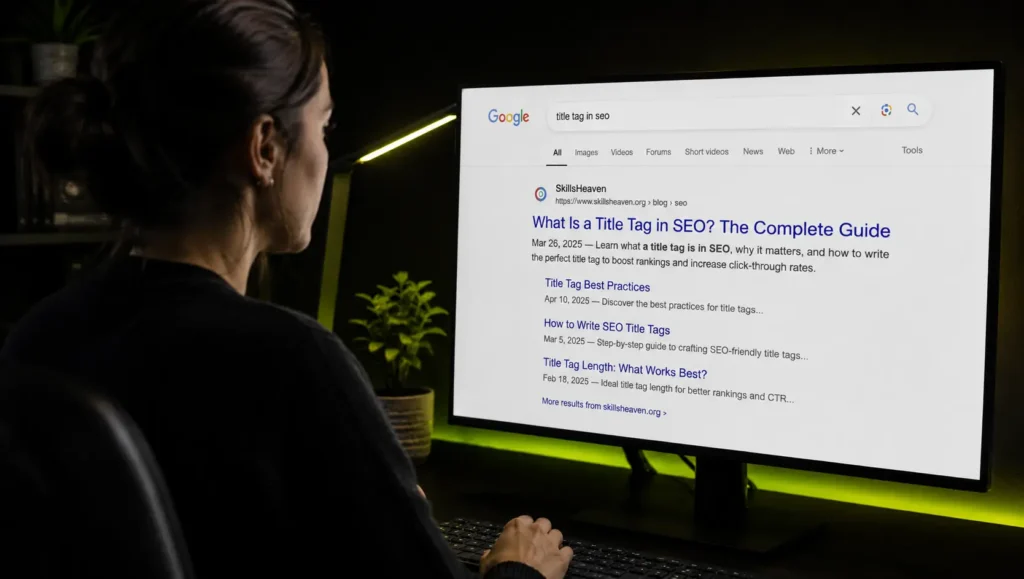
A title tag, also written as the HTML title element, provides a webpage title that can show up in search engine results pages as the SEO title, in link previews as the text that appears when users share a link via social media or messaging apps, in browser tabs as the text at the top of the browser tab, and in AI responses as the preview title AI systems include when linking to their sources.
In raw HTML, a title tag looks like this inside the head section of your page:
<head> <title>What Is a Title Tag in SEO? Complete Guide | SkillsHeaven</title> </head>
A title tag, also known as SEO titles and meta title tags, is an element in the section of the HTML code of your web page that specifies its title on search engine results pages. Title tags are short, summed-up alternative page headlines whose purpose is to inform searchers of the content they can find on the linked page.
Think of it this way: if your webpage were a book, the title tag would be the text printed on the spine and the front cover. It is the first thing someone reads to decide whether to open it or leave it on the shelf.

What Is a Meta Title in SEO and How Is It Different from a Title Tag?
This is one of the most common points of confusion in SEO, and it is worth addressing directly.
The title tag, also known as the meta title or SEO title, for a page on your website is the most important piece of meta information you can provide to search engines and internet users. Meta information includes the tags, headers, and descriptions for a website and its pages.
The terms “title tag,” “meta title,” and “SEO title” all refer to the same HTML element. They are used interchangeably across the SEO industry. The title tag is often called the meta title. However, technically speaking, the title tag is not a meta tag in the strict HTML sense, because meta tags use the meta HTML element with a name attribute, while the title tag uses its own distinct title element.
For all practical SEO purposes, when someone refers to your meta title, your SEO title, or your title tag, they are talking about the same thing: the HTML element that controls the headline appearing in search results.
What Is the Difference Between a Title Tag and an H1 Tag?
Another distinction that confuses many site owners is the relationship between a title tag and an H1 heading. They look similar and sometimes contain the same text, but they serve different functions.
Title tags and H1 header tags are not the same thing. They are sometimes confused with each other because they can have the same copy. Title tags appear in search results, browser tabs, and social shares, while H1 headings appear on your actual webpage.
Your title tag is what search engines show users before they click. Your H1 is the main visible heading users see after they land on your page. Both should be aligned in topic and intent, but they do not need to be word-for-word identical. In fact, using slightly different phrasing gives you an opportunity to target additional keyword variations without any duplication concern.
Your title tags and H1 tags should both convey the same information. They don’t need to be word-for-word the same. Increasing the length of your H1 in comparison with your title tag gives you the opportunity to rank for additional keywords and long-tail keywords related to your topic.
Does Meta Title Affect SEO? What the Data Says
Yes, and significantly. The title tag remains one of the most consistently cited on-page ranking signals in SEO, and its influence operates through two distinct channels.
Channel 1: Search Engine Relevance Signal
The title tag remains one of the most critical for SEO in 2026. Despite the rise of zero-click searches and AI-powered summaries, the title tag still functions as a strong relevance signal. It tells search engines what your page is about and plays a major role in determining your page’s click-through rate when it appears in search results.
Google’s own Senior Search representative has confirmed this directly. The meta tag title is still one of the factors that determine the position of web pages on the search list. It has a direct impact on ranking results. The meta title of a web page should mention the main topic of the page in a naturally readable way.
Channel 2: Click-Through Rate and User Behavior
Meta titles also impact click-through rates. A compelling title can significantly increase the likelihood of users clicking on your link instead of a competitor’s. According to a Backlinko study, pages with a well-optimized meta title have an 8.9 percent higher CTR than those that are not optimized.
Google has admitted through leaked documents and testimony that metrics like click-through rate and how a searcher interacts with a search results page are ranking factors. This means it is still important to optimize for title tags and headlines that generate high click-through rates and deliver on the promises of your meta titles and descriptions.
The mechanism is clear: a strong title tag earns more clicks, higher click-through rates send positive behavioral signals to Google, and those signals reinforce and improve your ranking position over time.
What Is Meta Title and Meta Description in SEO and How Do They Work Together?
Title tags and meta descriptions are the two HTML elements that together form your search result snippet. Understanding how they complement each other is essential for maximizing organic click-through rates.
The title tag functions as the headline: bold, blue (or purple if visited), and the primary decision-making text users read when scanning search results. The meta description sits beneath it as a supporting sentence or two that elaborates on the page’s content and value.
Google displays meta descriptions in the search engine results pages under the meta title to provide further context for users looking to make a decision on whether or not to click through to a website. While the title tag carries direct ranking weight, the meta description is not a direct ranking factor. However, a well-crafted meta description can increase website click-through rate and therefore increase organic website traffic.
Writing titles and descriptions that do not accurately represent your page content might get you clicks in the short term, but it will also get you high bounce rates, and Google deprioritizes your content based on that signal.
Think of the title tag as your headline advertisement and the meta description as your supporting copy. Both need to be honest, specific, and aligned with what users will actually find on the page. When they work together effectively, your listing performs like a well-written ad, drawing qualified clicks and sending strong engagement signals back to Google.
The Google Rewrite Problem: Why Your Title Tag Still Matters Even When Google Changes It
One of the most alarming realities of modern title tag optimization is that Google frequently replaces what you write with its own version.
Google rewrote 76 percent of title tags in Q1 2025, up from 61 percent in 2023. When Google rewrites a title, it removes an average of 2.71 words and retains only 35 percent of the original content. That is not tinkering. It is a near-complete replacement.
The three most common reasons Google rewrites titles are brand name removal at 63 percent of rewrites, readability and clarity improvements at 30 percent, and search intent alignment. Google rewrites to produce a title that better matches the user’s specific query, not primarily to include or remove keywords.
Despite this, optimizing your title tag is still non-negotiable. Here is why:
Without an optimized title tag, Google is completely starting from scratch. An optimized title tag gives search engines a starting point, making it easier for them to understand what your page is about and, ideally, use your version instead of rewriting. Google does not always get the rewrite right. The replacement title can be too long, too vague, or even misleading, which undercuts your work. The better your original title tag, the more likely Google is to leave it alone.
Google uses the original HTML title for ranking assessment even when it displays a different version. Writing short, intent-aligned, and clear titles reduces rewrite frequency.
How to Write Title Tags for SEO: A Step-by-Step Framework
Step 1: Lead with Your Primary Keyword
Front-loading your title tag with your primary keywords is the most effective technique for improving both visibility and click-through rates. Google tends to give more weight to keywords at the beginning of your title tag. Users are power-scanning the search results and are more likely to click when they see their keywords first.
If your page targets “what is a title tag in SEO,” the title should begin with those words or a close natural variation, not end with them or bury them in the middle.
Step 2: Keep It Within the Right Length
As a best practice, aim to keep your title tags roughly 50 to 60 characters long. Address the main point of your article in your title tag first, then add any additional information after if it can fit.
It is worth noting that Google measures title length in pixels, not characters. Rather than using a character count, Google has a fixed pixel width for titles. As a general guideline, aim for a title that fully displays on mobile search results, clearly communicates the main topic, and avoids unnecessary filler words. A practical target is 50 to 60 characters, which generally falls within Google’s display window for both mobile and desktop results.
Step 3: Match the Search Intent Precisely
Match your title tag to search intent to increase the likelihood of getting more clicks. Search intent is the user’s main goal when searching for a keyword, and can include finding information, visiting a specific page, comparing products, or making a purchase.
A page targeting an informational query like “what are title tags in SEO” should have a title that signals a definition or guide, not a product or service page. Mismatched intent between your title and the searcher’s goal leads Google to rewrite your title and users to immediately bounce after clicking.
Step 4: Write a Unique Title for Every Single Page
Each website page should have a unique title tag. Duplicate titles can confuse search engines and make it harder for your individual pages to rank for specific terms.
Duplicate title tags are one of the most common and damaging technical SEO errors on large websites. When multiple pages share the same title, search engines cannot distinguish between them, which often results in neither page ranking effectively for its target query.
Step 5: Avoid Keyword Stuffing
Stick to one target keyword in the SEO title tag. Avoid keyword stuffing, or cramming multiple similar keywords into a title. Keyword stuffing may cause AI systems and search engines like Google to view your page as spammy, and then disregard it or show it lower in search results.
A title like “Title Tag SEO | What Is a Title Tag | Meta Title SEO Guide” is the kind of tag Google will rewrite immediately and users will distrust on sight. Stick to one clear primary keyword and one supporting idea, expressed in natural language.
Step 6: Add Your Brand Name at the End (When It Makes Sense)
For most pages, put your brand name at the end of your title tag, separated by a pipe symbol. For example: “15 Best Kitten Toys of 2026 | Petco.” For your homepage only, putting your brand at the front is a good choice. For example: “Petco: Pet Supplies, Pet Food, and Pet Products.”
For lesser-known brands competing on informational queries, the brand name can sometimes be omitted entirely to free up character space for more impactful keyword and value language.
Step 7: Use Numbers, Power Words, and the Current Year Strategically
A great method for enticing users to click on your page in search results is by using action words in your title tags. For fresh and current content, adding the year communicates the freshness of your content. Signaling comprehensive content by adding phrases such as “ultimate guide,” “complete,” “step by step,” or “definitive” works effectively for certain queries.
The year, specific numbers, and clear value language all differentiate your listing from the crowd and set accurate expectations for what users will find, reducing bounce rates and improving engagement signals.

How to Write Meta Title and Description for SEO Together
Writing your title and description as a coordinated pair, rather than as separate elements, consistently produces better results.
Start with your title and make it specific and keyword-forward. Then write your meta description as a natural continuation of the title’s promise, elaborating on what the user will get, adding a relevant keyword variation, and ending with a clear call to action.
The ideal length for meta descriptions in 2026 is around 150 to 155 characters. Lead with the value proposition: answer why this result beats the other results on the page. Keep it concise and active, with one to three sentences, active voice, and a clear next step.
An example of a well-paired title and description:
Title: What Is a Title Tag in SEO? Complete Guide | Skills Heaven
Description: A title tag is the HTML element that controls your headline in search results. Learn what it is, how it affects rankings, and how to write one that earns clicks.
Notice that the description does not repeat the title word-for-word. It expands the promise, adds context, and gives the user a reason to choose this result over the alternatives sitting directly beside it.
Read About : Why is having duplicate content an issue for SEO?
How to Craft the Perfect SEO Image Title Tag
Image SEO is an often-overlooked dimension of title tag optimization. Every image on your website carries its own set of SEO signals including the image file name, the alt text, and in some cases the image title attribute.
The image title attribute is a separate HTML element from the page title tag, but it follows similar optimization principles. It should describe what the image shows, include a relevant keyword where it fits naturally, and be written for clarity rather than for keyword density.
The alt attribute is used to describe the content of images on your website. It is crucial for accessibility, allowing screen readers to understand images, and it plays a role in SEO, especially in image search. The alt text should be descriptive and provide an accurate description of what the image shows, with relevant keywords integrated naturally.
For a complete SEO image title tag approach, follow this structure for every image you publish:
The image file name should describe the image using keywords separated by hyphens, for example “seo-title-tag-example.jpg” rather than “image001.jpg.” The alt text should describe what the image shows in a natural sentence that includes your target keyword where relevant. The image title attribute, which appears as a tooltip on hover, should add brief additional context about the image. Together, these three elements signal to Google’s image search algorithm exactly what your image depicts, which improves your chances of appearing in image search results and provides additional relevance signals for the parent page.
Is Meta Refresh Bad for SEO?
The meta refresh tag is an entirely different HTML element from the title tag, but it is a common source of confusion for site owners exploring their metadata options.
A meta refresh is an instruction embedded in a page’s head section that automatically redirects users to another URL after a specified number of seconds. While it can serve legitimate purposes in some very narrow use cases, from an SEO perspective it is almost always harmful.
The core problem with meta refresh is that it sends far weaker ranking signals than a proper 301 permanent redirect. When search engines encounter a meta refresh, they must decide whether to transfer the ranking authority of the original page to the destination URL, and they often do so incompletely or inconsistently. A 301 redirect, by contrast, passes approximately 90 to 99 percent of link equity to the destination page cleanly and predictably.
Additionally, meta refresh creates a poor user experience by delaying the transition to the intended page without explanation, which can increase bounce rates and confuse users who notice the URL changing unexpectedly. For any legitimate redirect need, whether consolidating duplicate URLs, moving content to a new location, or redirecting discontinued pages, a 301 redirect is the correct technical solution. Meta refresh should be avoided in almost all SEO contexts.
Where Title Tags Appear: The Three Key Placements
In Search Engine Results Pages
This is where title tags have their greatest impact. An SEO title tag helps search engines understand what your website’s pages are about. In search engine results, the title tag acts as the page’s main title, displayed as the clickable headline above the URL and meta description.
This is the placement that directly affects your click-through rate and the first impression your brand makes on potential visitors.
In Browser Tabs
A unique title tag acts as a placeholder and is useful in instances when a user has many tabs open, helping them keep track of your content. When someone has a dozen tabs open, the visible text in each tab is pulled from your title tag. Clear, distinct title tags help users find their way back to your page rather than closing it accidentally.
In Social Media and AI Response Previews
When users share links via social media or messaging apps, the title tag appears as the text in the link preview card. In AI responses, the title tag appears as the preview title AI systems include when linking to their sources.
As AI-powered search tools like Google’s AI Overviews, ChatGPT, and Perplexity increasingly cite web sources in their generated answers, a clear and descriptive title tag becomes even more important for ensuring your content is presented accurately when AI systems reference it.
Title Tag Mistakes That Kill Your Rankings
Missing title tags entirely
If you do not have a title tag, search engines like Google will often create one for you. This auto-generated title is usually based on the main heading on your page or a snippet of your content. This can lead to a generic, unappealing title that will not perform well in search, and you lose control over an important piece of your branding and messaging.
Duplicate title tags across multiple pages
Every page on your site competing for different queries needs a unique title. Duplicate titles divide ranking signals and prevent either page from establishing clear topical authority.
Titles that are too long
Studies show Google rewrites 3 out of 4 title tags. Usually because they are too long, vague, or overloaded with keywords. When that happens, you lose control over what shows up in the search results. Sometimes Google grabs the H1 of the page. Other times, it generates something entirely new, and not always better.
Generic or vague titles
If your title tag is something vague like “Fun Pet Products,” Google might struggle to figure out what the page is actually about. The better Google understands your content, the more likely it will be matched to the most relevant searches.
Ignoring mobile display
Since Google uses mobile-first indexing, always preview how your title tag renders on a mobile search result before publishing. A title that displays perfectly on desktop may be truncated on mobile, cutting off critical keywords or the brand name.
Using outdated years
If you added a year to a title tag in a previous year to show the content is up to date, that title is going to look stale in the following year. Update year references when refreshing content to maintain the freshness signals that help content rank for time-sensitive queries.
Monitoring and Improving Your Title Tags Over Time
Title tag optimization is not a one-time task. It is an ongoing process of testing, monitoring, and refining based on real performance data.
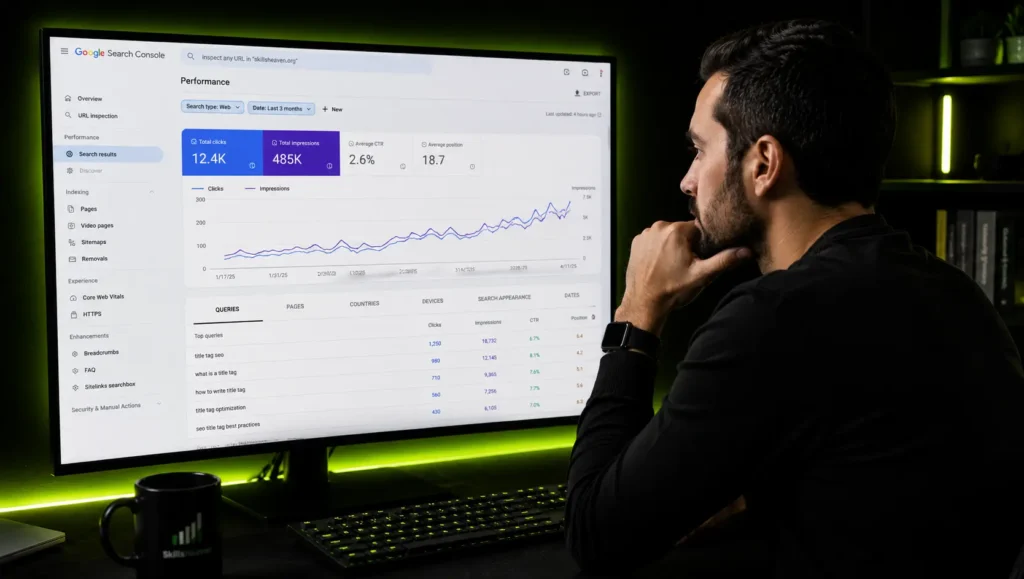
If Google is going to rewrite your title tag anyway, you might wonder what the point is. But a good title tag grabs the reader’s attention, and it works with the meta description to get the searcher to click your result. If they are working well, you should see an increase in your click-through rate via Google Search Console. Pages with the lowest CTRs should be first in line for an SEO title tag refresh.
Updating the SEO title and meta description to make them more engaging and relevant can increase traffic to a page by over 30 percent. This change does not necessarily affect rankings significantly, but it can dramatically improve click-through rates. This shows that optimizing SEO titles after publication can be an effective way to increase traffic, especially if your page already ranks well but receives fewer clicks than expected. (Source: Yoast)
Check Google Search Console monthly, filter for pages with strong average positions but low click-through rates, and prioritize those pages for title tag updates. A page ranking in position 4 or 5 with a compelling title update can often match or exceed the traffic of a page in position 2 or 3 with a weak title.
Title Tags for AI Search: Optimizing for the Next Generation of Search
A key focus for title tags is optimizing for AI Overviews and tools like ChatGPT, especially as they display title tags and sources more prominently. AI Overviews already show title tags and sources, which is promising, but the real opportunity lies in standing out among the cited resources once your site is included.
As search evolves beyond traditional engines to include AI-powered answer systems and generative platforms, optimizing titles has become more complex and more critical. AI systems prioritize content that clearly answers user questions. Answer search intent directly in your title. Titles that clearly signal the answer format or the specific question being addressed perform better in AI-generated results.
For AI search visibility specifically, titles that frame the page as a direct answer to a specific question tend to be cited more frequently than vague or brand-forward titles. A title like “What Is a Title Tag in SEO? Complete Guide” signals to AI systems exactly what question the page answers, making it more likely to be pulled into a generated response when a user asks that question.
Frequently Asked Questions About Title Tags in SEO
What is a title tag in SEO for someone who has never done SEO before?
A title tag in SEO is the text that appears as the clickable headline in Google search results. When you search for something and see a list of results, the bold text you click on to visit a website is that website’s title tag. It lives inside the invisible code of the webpage and tells both Google and users what the page is about.
What are title tags in SEO and how many should each page have?
Each page on your website should have exactly one unique title tag. Title tags have two main purposes: they inform the searchers of the content they can find on the linked page, and they help search engines understand what topic the page covers so it can be matched to relevant search queries. Having more than one title tag on a page causes validation errors, and having no title tag forces Google to generate one automatically, which is rarely optimal for rankings or clicks.
Does meta title affect SEO for local businesses differently than for national brands?
The principles are the same, but the execution differs. Local businesses should include location-specific terms in their title tags where appropriate, such as the city or service area, because local search queries carry geographic intent. Including “Dubai SEO Agency” rather than just “SEO Agency” in a title tag directly improves relevance for users searching in or for that location.
What is an SEO title tag for images specifically, and does it matter?
The image title attribute provides supplementary context to search engines about what an image depicts. While the image alt text carries more SEO weight for image search rankings, a descriptive image title attribute contributes to overall page relevance and accessibility. Every image should have a descriptive alt text as the priority, with an optional title attribute for additional context.
How to write meta title and description for SEO when targeting competitive keywords?
For highly competitive keywords, differentiation matters more than keyword density. When most titles in the SERPs are between 45 and 55 characters, a shorter title that includes keywords and possibly a number can draw attention to your listing. Standing out helps maintain rankings and also increases click-through rates. Study the title tags of the top three ranking pages for your target keyword, identify the pattern they all follow, and then write a title that follows the same intent-matching principles while being meaningfully different in its specific value proposition.
Is meta refresh bad for SEO and should I ever use it?
Yes, meta refresh is generally bad for SEO in virtually all practical scenarios. It creates weaker redirect signals than a 301 permanent redirect, can confuse search engines about which URL should carry ranking authority, and delivers a poor user experience. The only narrow exception might be very brief meta refresh redirects used in specific CMS environments where server-side redirects are not accessible, but even in those cases, transitioning to proper 301 redirects as soon as possible is strongly recommended.
How often should I update my title tags?
You should update your title tags whenever your content significantly changes, your target keywords shift, or your search intent changes. Beyond those trigger events, review your title tags quarterly through Google Search Console, prioritizing pages with strong ranking positions but below-average click-through rates. Those are pages where a title tag improvement can produce measurable traffic gains without requiring any ranking improvement at all.
What happens if two pages on my site have the same title tag?
Duplicate title tags are a significant technical SEO problem. Every page must have a unique SEO page title. Otherwise, Google becomes confused. Titles like “Welcome” or “Products” mean nothing to search engines. Each title should give clarity, relevance, and branding specific to that page’s content. When duplicate titles exist, Google must decide which page to rank for the shared keyword, and it often ranks neither page as strongly as one well-optimized page would rank on its own.
Summary: What Is a Title Tag in SEO and Why Does It Matter So Much?
A title tag in SEO is the most important piece of on-page metadata your website publishes. It controls the headline users see in search results, the text displayed in browser tabs, the headline in social media link previews, and increasingly the citation label in AI-generated search responses. It influences whether Google can correctly categorize your page, whether users choose to click your result over competing listings, and whether the behavioral signals flowing back to Google reinforce or undermine your rankings over time.
The practical priorities are straightforward: write a unique title for every page, lead with your primary keyword, stay within the 50 to 60 character display window, match the exact intent of the searcher, avoid keyword stuffing, and monitor click-through rates regularly to identify pages where a title update could drive meaningful traffic improvements without requiring any additional link building or content creation.
In an era where Google rewrites the majority of title tags it encounters, the best protection you have is writing titles so clear, specific, and intent-aligned that Google has no reason to change them. Master that, and your title tags become one of the most reliable and cost-effective levers in your entire SEO strategy.

M. Awais Khan is a Business Development and Digital Growth Strategist at SkillsHeaven, specializing in SEO, local search optimization, and performance-driven digital marketing. With experience supporting 100+ businesses, he develops and implements data-driven strategies that help companies increase online visibility, generate qualified leads, and drive sustainable revenue growth. His expertise spans Local SEO, Google Ads, social media marketing, and conversion-focused website optimization, ensuring every project is aligned with measurable business outcomes and long-term success.