
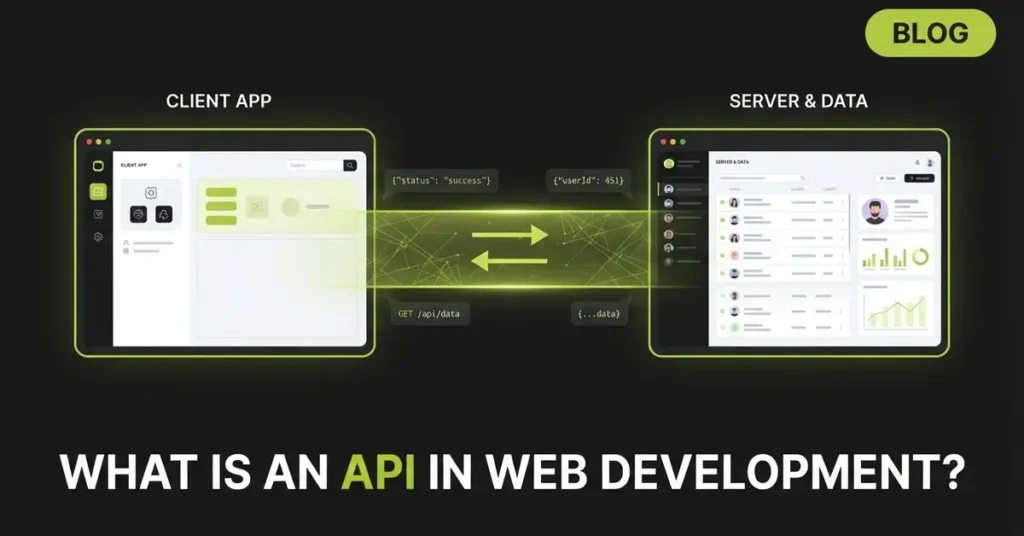
Every time you check the weather on your phone, log in with Google, or pay online with Stripe, an API is working behind the scenes. APIs power almost everything modern software does, yet the concept confuses more beginners than nearly any other topic in web development.
This guide explains what is an API in web development actually means in plain English, shows you how APIs work with real examples, and gives you a practical roadmap to start using them yourself.
What Is an API? (Simple Definition)
An API (Application Programming Interface) is a set of rules that allows two software applications to communicate with each other. In web development, an API lets a client, such as a website or mobile app, request data or services from a server and receive a structured response, usually in JSON format.
That is the textbook answer. Here is the version that actually makes it click.
The Restaurant Analogy That Makes APIs Click
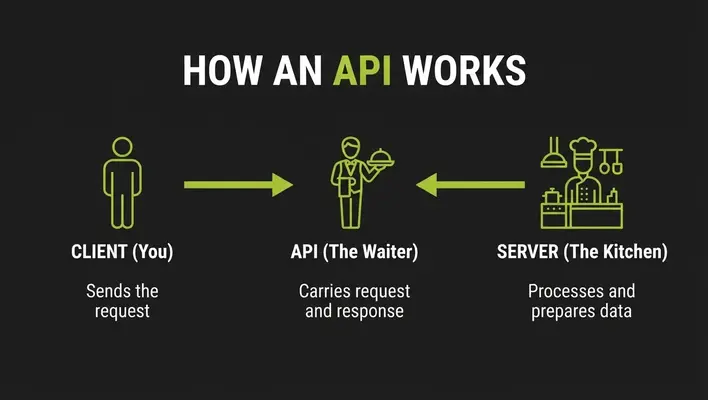
Imagine a restaurant. You (the customer) want food, but you cannot walk into the kitchen and cook it yourself. Instead, you read the menu, tell the waiter your order, and the waiter carries it to the kitchen. The kitchen prepares your dish, and the waiter brings it back to your table.
In this analogy:
- You are the client (a browser or app)
- The menu is the API documentation, listing what you can request
- The waiter is the API, carrying requests and responses back and forth
- The kitchen is the server, where the actual work happens
- The dish is the response, the data you asked for
And if you order something the kitchen ran out of? The waiter comes back and says “sorry, we don’t have that.” That is essentially a 404 error.
The key insight: you never see how the kitchen works, and you don’t need to. The API hides the complexity and gives you a simple, predictable way to get what you need.
What API Stands For and What It Actually Means
API stands for Application Programming Interface. The important word is interface: a defined boundary where two systems meet and exchange information following agreed-upon rules. An API is not a database, not a server, and not a programming language. It is the contract that describes how software talks to software.
How Do APIs Work in Web Development?
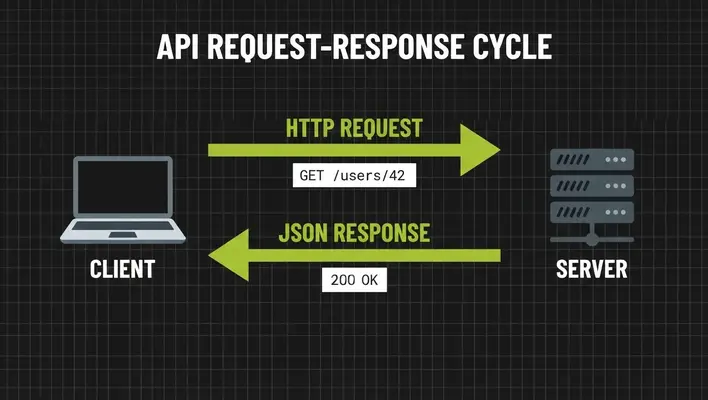
Web APIs work on the client-server model. The client (frontend) sends a request over HTTP, the server (backend) processes it, and the server sends back a response. This cycle repeats millions of times per second across the internet.
Anatomy of an API Request
Every API request has four main parts:
- Endpoint: The URL you are calling, such as
https://api.example.com/users/42 - Method: The action you want (GET, POST, PUT, DELETE)
- Headers: Metadata like authentication tokens and content type
- Body: The data you are sending (used with POST and PUT requests)
Anatomy of an API Response
The server replies with:
- Status code: A three-digit number telling you what happened
- Headers: Metadata about the response
- Body: The actual data, almost always in JSON
A Real Example: Fetching Weather Data
Here is a genuine API call using JavaScript’s Fetch API:
javascript
fetch("https://api.openweathermap.org/data/2.5/weather?q=Dubai&appid=YOUR_API_KEY")
  .then(response => response.json())
  .then(data => console.log(data.main.temp));
The server responds with JSON like this:
json
{
  "name": "Dubai",
  "main": {
    "temp": 305.15,
    "humidity": 42
  },
  "weather": [{ "description": "clear sky" }]
}
Your app never touches the weather provider’s database or satellites. It simply asks the waiter, and the kitchen handles the rest.
Key API Concepts Every Developer Should Know
HTTP Methods
HTTP methods map directly to CRUD operations (Create, Read, Update, Delete), as defined in RFC 9110:
| Method | Action | Example |
|---|---|---|
| GET | Read data | Fetch a user profile |
| POST | Create data | Register a new user |
| PUT / PATCH | Update data | Edit a profile |
| DELETE | Remove data | Delete an account |
Status Codes
Status codes tell you instantly whether a request succeeded:
| Code | Meaning | What It Tells You |
|---|---|---|
| 200 | OK | Request succeeded |
| 201 | Created | New resource created |
| 400 | Bad Request | Your request was malformed |
| 401 | Unauthorized | Missing or invalid credentials |
| 404 | Not Found | The resource doesn’t exist |
| 429 | Too Many Requests | You hit a rate limit |
| 500 | Server Error | Something broke on their end |
Beginner tip: Codes starting with 4 mean you made a mistake. Codes starting with 5 mean the server did.
JSON: The Language of Modern APIs
JSON (JavaScript Object Notation) is a lightweight, human-readable data format made of key-value pairs. Nearly every modern web API sends and receives JSON because it is compact, easy to parse in any language, and easy to read. If you can read the weather example above, you can read JSON.
Types of APIs in Web Development
REST APIs
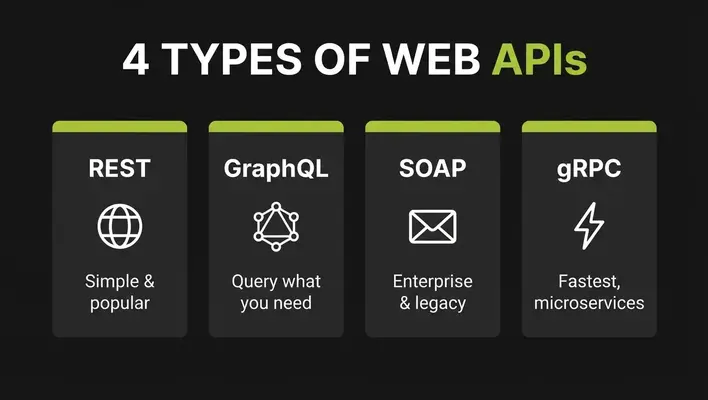
REST (Representational State Transfer) is the most common API style on the web. RESTful APIs treat everything as a resource accessible through a URL, use standard HTTP methods, and are stateless, meaning each request contains everything the server needs. REST’s simplicity and use of existing web standards made it the default choice for most public APIs.
GraphQL APIs
GraphQL, developed by Facebook and now an open standard, solves REST’s biggest annoyance: over-fetching. With REST, an endpoint returns a fixed data shape whether you need all of it or not. With GraphQL, the client asks for exactly the fields it wants in a single query, and the server returns exactly that. It shines in mobile apps and complex frontends where bandwidth and flexibility matter.
SOAP APIs
SOAP (Simple Object Access Protocol) is an older, XML-based protocol with strict contracts and built-in standards for security and transactions. You will mostly encounter it in banking, insurance, and enterprise legacy systems. It is verbose but extremely formal, which regulated industries value.
gRPC APIs
gRPC, created by Google, uses Protocol Buffers (a compact binary format) instead of JSON, making it dramatically faster. It is the go-to choice for internal microservice-to-microservice communication where performance matters more than human readability.
Webhooks and WebSockets
Standard APIs are pull-based: the client must ask. Two patterns flip this:
- Webhooks are “reverse APIs.” The server calls you when an event happens, like Stripe notifying your app the moment a payment succeeds.
- WebSockets keep a persistent, two-way connection open, powering live chat, multiplayer games, and real-time dashboards.
REST vs GraphQL vs SOAP vs gRPC: Quick Comparison
| Feature | REST | GraphQL | SOAP | gRPC |
|---|---|---|---|---|
| Data format | JSON | JSON | XML | Protocol Buffers |
| Best for | Public web APIs | Flexible frontends | Enterprise/legacy | Microservices |
| Learning curve | Easy | Moderate | Steep | Moderate |
| Performance | Good | Good | Slower | Fastest |
| Fetching style | Fixed endpoints | Query exactly what you need | Contract-based | Function calls |
Public, Private, Partner, and Composite APIs
APIs are also classified by who can access them:
- Public (Open) APIs: Available to any developer, like OpenWeather or PokéAPI
- Private (Internal) APIs: Used only inside a company, connecting internal systems
- Partner APIs: Shared with specific business partners under agreements
- Composite APIs: Bundle multiple calls into one request, reducing round trips
Most APIs in the world are actually private, quietly connecting internal systems you never see.
Browser Web APIs vs Server-Side APIs
This is where most beginners get confused, and almost no guide clears it up.
The term “API” describes two different things in web development:
- Browser Web APIs are built into your browser and let JavaScript interact with the browser itself. The Fetch API makes HTTP requests, the DOM API manipulates page elements, and the Geolocation API reads the user’s location. No server involved.
- Server-side (web service) APIs live on a remote server and deliver data over the internet, like the weather API earlier.
Here is how they connect: your frontend uses a browser API (Fetch) to call a server-side API (your backend). One API is the tool; the other is the destination. Once you see that distinction, the word “API” stops being confusing.
API Authentication and Security
Most useful APIs need to know who is calling. Authentication answers “who are you?” while authorization answers “what are you allowed to do?”
API Keys
A unique string identifying your application, passed in a header or URL parameter. Simple, but treat keys like passwords: never commit them to public repositories. This is one of the most common beginner mistakes in real projects.
OAuth 2.0
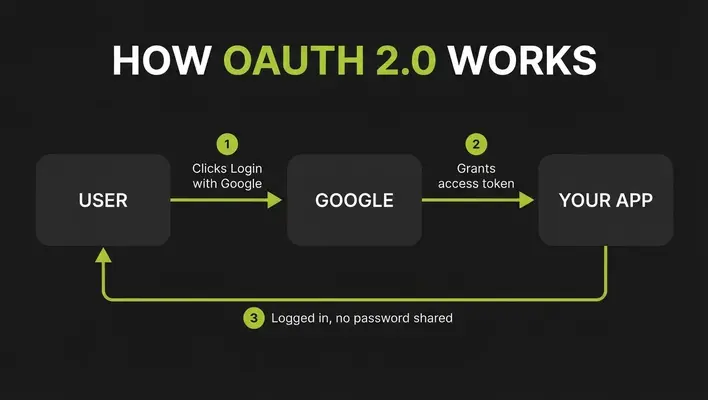
OAuth 2.0 is the standard behind “Log in with Google.” It lets users grant an app limited access to their data on another service without ever sharing their password. The app receives a temporary access token instead.
JWT (JSON Web Tokens)
A JWT is a compact, signed token containing user identity and permissions. The server issues it at login, and the client attaches it to every subsequent request, letting the server verify identity without a database lookup each time.
Security Best Practices
- Always use HTTPS, never plain HTTP
- Apply rate limiting to prevent abuse
- Validate every input on the server
- Follow the OWASP API Security Top 10
- Configure CORS deliberately, not with a wildcard
Real-World API Examples You Use Every Day
- Google Maps API: Powers the embedded maps on ride-sharing and delivery apps
- Stripe API: Handles payments for millions of online stores
- Login with Google/Facebook: OAuth in action
- AI APIs: Tools like ChatGPT and Claude are consumed by thousands of apps through APIs, making this one of the fastest-growing API categories today
- Weather widgets: Almost all pull from a weather data API
How to Start Working With APIs (Beginner Roadmap)
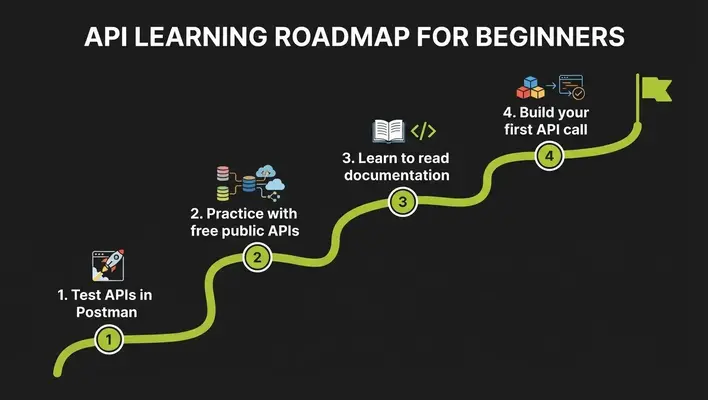
Step 1: Make Your First Call With Postman
Postman is a free tool that lets you test APIs without writing any code. Paste an endpoint URL, choose GET, click Send, and inspect the JSON response. It is the fastest way to build intuition.
Step 2: Practice With Free Public APIs
- JSONPlaceholder: Fake data for practicing requests, zero setup
- PokéAPI: Pokémon data, no key required
- OpenWeather: Real weather data with a free key
Step 3: Learn to Read Documentation
Good documentation lists every endpoint, its parameters, and example responses. Many follow the OpenAPI Specification, which standardizes how APIs are described. Reading docs is a skill; the more you read, the faster you get.
Common Beginner Mistakes to Avoid
- Exposing API keys in frontend code or public GitHub repos
- Ignoring status codes and assuming every response succeeded
- Not handling errors, so the app crashes when the API is down
- Hammering an API in a loop and hitting rate limits
- Skipping the documentation and guessing endpoint behavior
Advanced API Concepts
- Versioning: APIs evolve. Versioned URLs like
/v1/usersand/v2/userslet providers improve without breaking existing apps. - Rate limiting: Caps how many requests a client can make per minute, protecting servers from abuse. Exceed it and you get a 429.
- Caching: Storing frequent responses temporarily so repeat requests are served instantly, cutting server load and latency.
- Error handling: Well-designed APIs return clear, structured error messages, not just a bare 500.
- API-first development: Modern teams design and document the API before writing application code, treating it as the product’s foundation.
Why APIs Matter: The API Economy
APIs are no longer just a technical detail; they are business infrastructure. Companies like Stripe and Twilio built billion-dollar businesses selling only APIs. Postman’s annual State of the API report consistently shows the overwhelming majority of developers work with APIs daily, and API-first companies ship faster because teams build independently against agreed contracts. Just as an SEO-friendly website structure organizes content for search engines, a well-designed API organizes data for other applications. Learning APIs is not optional for a web developer in 2026; it is the job.
FAQs
What is an API in simple words?
An API is a messenger that lets two applications talk to each other. One app sends a request, the API carries it to the other app, and brings back a response, following rules both sides agree on.
Is an API frontend or backend?
Neither, exactly. An API is the bridge between them. The backend provides the API, and the frontend consumes it, but browser Web APIs like Fetch exist purely on the frontend side.
What is the difference between an API and a database?
A database stores data; an API provides controlled access to it. Apps almost never talk to a database directly over the internet. The API sits in front as a secure gatekeeper.
What is the difference between an API, a library, and an SDK?
A library is code you import into your project. An SDK is a full toolkit (libraries, docs, tools) for building on a platform. An API is the interface itself, the rules of communication. An SDK often wraps an API to make it easier to use.
Do I need to know a programming language to use an API?
To explore one, no. Tools like Postman let you call APIs with zero code. To build APIs into a real application, you will need JavaScript, Python, or a similar language.
Are APIs free to use?
Many public APIs offer free tiers with rate limits, then charge for higher volume. Others, like Stripe, charge per use. Always check the pricing page before building on one.
Can I build my own API as a beginner?
Yes. With Node.js and Express or Python and Flask, you can build a working REST API in an afternoon. It is one of the best learning projects in web development.
Conclusion
So, what is an API in web development? It is the agreed-upon interface that lets applications exchange data: the waiter between your app and someone else’s kitchen.. You now know how the request-response cycle works, the difference between REST, GraphQL, SOAP, and gRPC, how authentication protects APIs, and the exact difference between browser APIs and server-side APIs that trips up most beginners.
The best next step is practical: open Postman, call JSON Placeholder, and watch a real JSON response come back. And if your business needs a fast, secure, conversion-focused website built on these foundations, our professional web development team at Skills Heaven builds exactly that. Once you have made your first successful API call, the rest of web development starts making a lot more sense.

M. Awais Khan is a Business Development and Digital Growth Strategist at SkillsHeaven, specializing in SEO, local search optimization, and performance-driven digital marketing. With experience supporting 100+ businesses, he develops and implements data-driven strategies that help companies increase online visibility, generate qualified leads, and drive sustainable revenue growth. His expertise spans Local SEO, Google Ads, social media marketing, and conversion-focused website optimization, ensuring every project is aligned with measurable business outcomes and long-term success.