CMS stands for Content Management System, which is software that lets you create, edit, organize, and publish digital content on a website without writing code for every single change. In web development, a CMS sits between your website’s design and its content, giving website owners, marketers, and editors a simple, visual way to manage pages, blog posts, images, and other content while developers focus on structure, functionality, and performance.
If you are searching for what does CMS stand for in web development and want a genuinely thorough explanation, not just a one line definition, this guide covers everything from how a CMS actually works behind the scenes to the different types available, the most popular platforms, and how to choose the right one for your project.
What Is a CMS in Web Development, in Plain Terms
A CMS in web development is the layer that separates content from code. Before content management systems became standard, updating a website meant editing raw HTML files directly, which required either technical knowledge or a developer on call for even small changes like fixing a typo or swapping a photo. A CMS removes that bottleneck entirely. It gives non technical users direct control over text, images, and pages through a visual dashboard, while developers build the templates, design system, and custom functionality that sit underneath that dashboard.
This division of labor between content and code is the single biggest reason content management systems have become the default approach for building and maintaining most websites today, from small business sites to large media publications.
The Two Core Parts Every CMS Is Built On
Most content management systems are built around two connected components, even if the platform hides this structure behind a single interface.
The Content Management Application
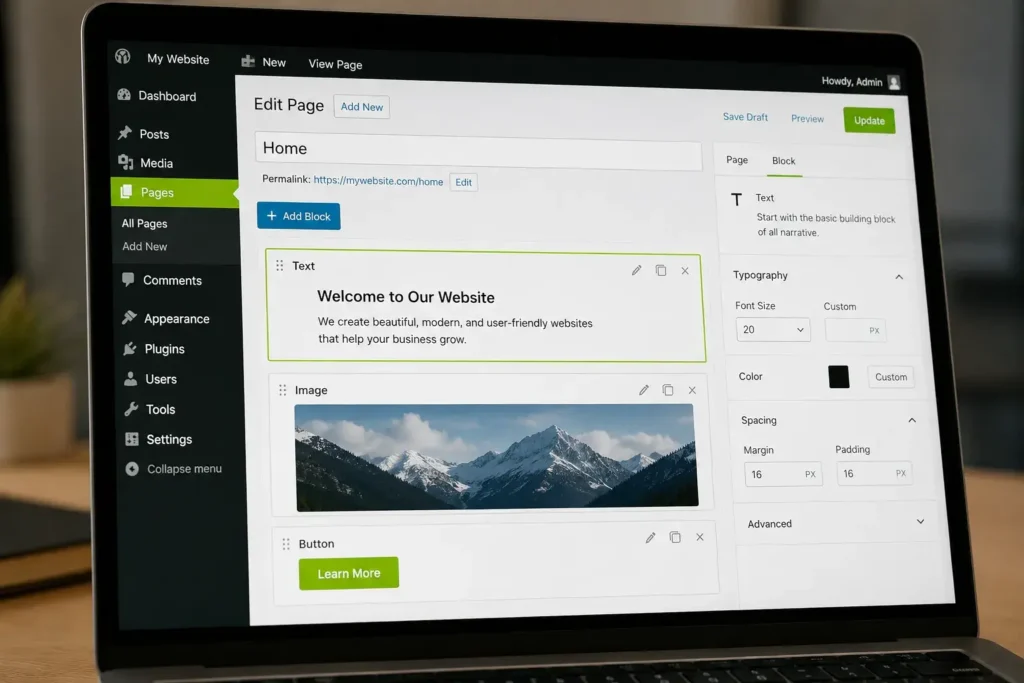
The content management application, often shortened to CMA, is the front end interface that a non technical user actually sees and interacts with. This is the dashboard where you log in, click “add new page,” type your content into an editor, upload an image, and hit publish. The CMA is designed to feel intuitive, often using drag and drop blocks or a familiar word processor style layout, so that someone with no coding background can still manage content confidently.
The Content Delivery Application
The content delivery application, or CDA, works behind the scenes. Once you save or publish something through the CMA, the CDA takes that input, assembles it with the website’s templates and code, and displays the finished result to anyone visiting the live site. You never see the CDA directly, but it is the part actually responsible for turning your content into a real, functioning webpage.
Understanding this CMA and CDA relationship makes it much easier to understand the differences between CMS types later in this guide, since those differences mostly come down to how tightly or loosely these two components are connected.
How a CMS Actually Works Step by Step
A typical content management workflow follows a consistent pattern across most platforms.
- Content creation: A user logs into the CMS dashboard and creates content using a built in editor, whether that is writing a blog post, building a new landing page, or uploading product photos.
- Storage: That content gets saved into a structured database, organized in a way the system can retrieve and reuse later, often broken into reusable fields like a title, body text, featured image, and metadata.
- Templates and design: Developers build templates and layout components in advance, things like a homepage layout, a blog post template, or a product page structure, all styled to match the brand.
- Assembly and delivery: When a visitor loads a page, the system pulls the relevant content from the database and slots it into the appropriate template, generating the page in real time or from a cached version for speed.
- Publishing and updates: Because content lives separately from the site’s underlying code, edits, new pages, and updates go live immediately without anyone needing to touch the website’s core files or rebuild anything manually.
This structure is also exactly what makes a CMS scalable. A single template can power thousands of individual pages, which is why ecommerce stores with huge product catalogs or publishers with years of archived articles can manage so much content without redesigning every page by hand.
The Different Types of CMS Architecture
Not every content management system connects its content and design in the same way. Understanding these architectural differences matters because the right choice depends heavily on what you are building.
Traditional or Coupled CMS
A traditional, also called coupled, CMS keeps the content management application and the content delivery application tightly connected within a single system. Content and design live together, which makes setup simpler and is why platforms like classic WordPress installations are considered coupled by default. This approach works well for organizations publishing to a single website and wanting an all in one solution without extra technical complexity.
Headless CMS
A headless CMS separates the back end content repository entirely from the front end presentation layer. Instead of the CMS rendering the website itself, it stores and organizes content, then delivers that content to any front end, a website, a mobile app, a smart device, or digital signage, through an API. This approach requires more development work upfront since a developer has to build the front end separately, but it offers significantly more flexibility for businesses publishing the same content across multiple platforms.
Decoupled CMS
A decoupled CMS sits somewhere between traditional and headless. It still separates the back end and front end like a headless system, but it usually comes with at least one pre built front end delivery option included, rather than leaving every front end to be built entirely from scratch. This gives teams more flexibility than a fully coupled system while requiring somewhat less front end development than a purely headless setup.
Hybrid CMS
A hybrid CMS combines elements of both traditional and headless approaches in a single platform. It typically offers the convenience of built in templates and a visual editor for teams that want to move quickly, while also exposing an API for developers who need to push that same content to other channels. This makes a hybrid CMS a practical middle ground for businesses that want speed without giving up future flexibility.
Categories of Content Management Systems by Purpose
Beyond architecture, content management systems are also grouped by what kind of content they are built to manage.
Web Content Management (WCM)
Web content management refers to systems specifically focused on managing the content of a public facing website, including text, images, video, and the page structures that present them to visitors. This is the category most people mean when they casually say “CMS,” and it covers the majority of platforms discussed throughout this guide.
Enterprise Content Management (ECM)
Enterprise content management governs how documents and digital assets move through an entire organization, not just a public website. This includes structured records and unstructured material such as contracts, internal policies, proposals, and rich media, along with controls over who can access, edit, or approve that material at each stage. Large organizations and government agencies often need ECM capabilities in addition to a standard website CMS.
Component Content Management System (CCMS)
A component content management system manages content at a modular, reusable level rather than as whole pages or articles. Content gets broken into smaller components, like individual paragraphs, instructions, or specifications, that can be reused across many different documents or publications without rewriting them each time. This approach is especially common in technical documentation, where the same instructions might need to appear across multiple product manuals or formats.
Digital Asset Management (DAM)
Digital asset management systems focus specifically on organizing and controlling files with clear ownership, such as videos, photographs, and other media assets, rather than text based content. A DAM is often used alongside a broader CMS to keep large media libraries organized and properly licensed.
Why a CMS Matters for Modern Websites
A CMS matters because it fundamentally changes who can manage a website and how quickly that website can evolve. With a CMS in place, marketing teams can launch a new landing page, publish a blog post, or update product information without waiting on developer availability. This speed supports faster campaigns, more consistent publishing schedules, and a website that genuinely keeps up with a growing business, rather than one that quietly falls behind because every change requires a development ticket.
Most modern content management systems also come with built in features that extend well beyond basic publishing, including SEO tools for managing titles and meta descriptions, security features like firewalls and SSL support, and analytics for understanding how content performs once it is live.
Popular CMS Platforms and What Each One Is Best For
WordPress
WordPress is widely recognized as the most commonly used content management system in the world, known for its open source flexibility, enormous plugin and theme ecosystem, and strong community support. It works well for almost any type of content focused website, from blogs and portfolios to large business sites, though it can become bloated or insecure if built with poorly maintained themes and plugins.
Drupal
Drupal is an open source CMS built around a modular design and an extensive API, giving developers significant freedom to customize functionality. It generally requires more technical skill to manage than more beginner friendly platforms, which is why it tends to suit large, content heavy organizations and government agencies with complex requirements.
Joomla
Joomla sits between WordPress and Drupal in terms of complexity, offering a flexible extension system and strong support for multilingual sites, while still requiring a moderate level of technical comfort to manage effectively.
Wix and Squarespace
Wix and Squarespace are hosted, all in one platforms that combine website building with built in content management, requiring no separate hosting setup. Squarespace in particular is known for polished, design forward templates that suit creatives, boutique brands, and small businesses prioritizing visual presentation with minimal technical overhead.
Webflow
Webflow combines a highly visual design interface with genuine CMS functionality underneath, appealing to designers who want fine grained control over layout and styling without writing extensive code.
Shopify and Magento
Shopify and Magento are content management systems built specifically around ecommerce. Shopify offers a more guided, hosted experience that handles much of the technical infrastructure automatically, making it popular with smaller stores wanting less technical overhead. Magento, now also known as Adobe Commerce, is open source and highly customizable, which makes it a common choice for larger retailers with complex product catalogs, though it generally requires a dedicated development team to manage well.

Headless Options Like Contentful and Ghost
Platforms like Contentful are built specifically as headless systems, focused on delivering content via API to multiple front ends rather than rendering a website directly. Ghost takes a more focused approach centered on publishing and blogging, with a clean, fast front end experience built in.
Benefits of Using a CMS
The advantages of a content management system are a major reason adoption has grown so consistently across businesses of every size. A CMS removes the need for coding knowledge for everyday content updates, allowing non technical team members to publish and edit confidently. It supports collaboration, letting multiple people work on content, design, and technical maintenance at the same time without stepping on each other’s work, as long as permissions and workflows are clearly defined. It reduces costs over time by cutting down reliance on developer hours for routine changes. It also supports multi channel distribution, since many modern systems can push the same content to a website, mobile app, and other platforms from a single source.
Things to Consider Before Choosing a CMS
Choosing the right content management system depends on several practical factors rather than picking whichever platform is most popular. Consider the technical expertise your team or developers already have, since a platform that matches existing skills will be far easier to maintain. Consider how well the system scales as traffic and content volume grow, particularly if you expect significant growth within a year or two. Consider the total cost, including hosting, premium themes or plugins, and any ongoing development work, not just the platform’s base price. Consider how frequently the platform receives security updates, since outdated, unmaintained systems are a common target for attacks. Finally, consider how well the CMS integrates with your existing marketing tools, such as email platforms or analytics software, since poor integration can quietly limit what your team can actually accomplish day to day.
How a CMS Connects to Responsive Design and Performance
A content management system rarely works in isolation. Most modern platforms pair naturally with responsive design, meaning the website automatically adjusts its layout across desktop, tablet, and mobile screens, since the majority of CMS themes are built responsively by default. Performance also matters significantly alongside content management, which is why many businesses pair their CMS with a content delivery network, a system of distributed servers that deliver website content from a location physically closer to each visitor, reducing load times for audiences spread across different regions. Together, a well chosen CMS, a responsive design approach, and strong performance infrastructure form the foundation of a fast, reliable, and easy to manage website.

Frequently Asked Questions
What does CMS stand for?
CMS stands for Content Management System, software that allows users to create, edit, and publish digital content without writing code directly.
What is the difference between a CMS and a website builder?
A website builder is typically a simplified, all in one tool aimed at quick setup with limited customization, while a CMS, especially platforms like WordPress or Drupal, generally offers far greater flexibility, scalability, and control over both design and functionality.
Is WordPress considered a CMS?
Yes, WordPress is widely regarded as the most popular content management system in use today, supporting everything from simple blogs to large, complex business websites through its extensive theme and plugin ecosystem.
What is the difference between a headless CMS and a traditional CMS?
A traditional CMS manages content and renders the website itself in one connected system, while a headless CMS stores and organizes content separately, delivering it to any front end through an API, which requires more development work but offers significantly more flexibility.
Do small businesses need an enterprise CMS?
Most small businesses do not need full enterprise content management capabilities and are typically better served by a standard web content management platform, reserving enterprise level systems for larger organizations managing complex internal documentation and approval workflows.
Does every CMS require coding knowledge to use?
No, most modern content management systems are specifically designed so non technical users can create and publish content through a visual dashboard, while coding knowledge becomes more relevant only for custom design, advanced functionality, or headless implementations.
Final Thoughts
Understanding what CMS stands for in web development goes well beyond a simple definition. It means recognizing how the content management and content delivery components work together, how different architectures like headless, decoupled, and hybrid systems serve different needs, and how categories like web content management and enterprise content management solve very different problems. Whether you choose a flexible general purpose platform like WordPress, an enterprise grade system like Drupal, or an ecommerce focused option like Shopify or Magento, the right CMS ultimately comes down to matching the platform to your team’s technical comfort, your content needs, and your long term growth plans.

M. Awais Khan is a Business Development and Digital Growth Strategist at SkillsHeaven, specializing in SEO, local search optimization, and performance-driven digital marketing. With experience supporting 100+ businesses, he develops and implements data-driven strategies that help companies increase online visibility, generate qualified leads, and drive sustainable revenue growth. His expertise spans Local SEO, Google Ads, social media marketing, and conversion-focused website optimization, ensuring every project is aligned with measurable business outcomes and long-term success.